Skip to the content
LeaplogicLeaplogic
  • Home
  • About Us
  • Contact
SIGN IN
  • Home
  • About Us
  • Contact

  • Getting Started
    • Before You Begin
    • Creating an Account
    • Logging into LeapLogic
    • Reset Password
    • Quick Tour of the Web Interface
    • LeapLogic in 15 minutes
      • Prerequisites
      • Step 1. Log into LeapLogic
      • Step 2. Create Assessment and Get Insights
      • Step 3. Create Transformation Pipeline and See Results
      • Step 4. Edit or Optimize the Transformed Code
      • Step 5: Complete the Transformation Lifecycle
  • Introduction to LeapLogic
    • Overview
    • High Level Architecture
    • Supported Legacy and Cloud Platforms
    • Key Features
  • LeapLogic Deployment Architecture & Prerequisites
  • Impetus LeapLogic Catalog
    • Overview
    • Dashboard
    • Enterprise Metadata Catalog
      • Managing Data Catalog
      • Creating Repo (Repository)
      • Creating DS (Data Source)
    • Entity-Relationship (ER) Model
    • Metadata Sync
      • Default Initial Import
      • On-Demand Sync
    • Agentic AI-Led PII Detection
    • Agentic AI-Led Description
    • Agentic AI-Led Domain Mapping
    • Sensitivity Stewardship
    • Semantic Harmonization
    • AI-Powered Metadata Assistant
    • Enterprise Process Catalog
    • Tag Management
    • Business Glossary
    • Role-Based Access Control (RBAC)
  • Impetus LeapLogic Lineage
    • Overview
    • Creating Lineage - Deterministic Engine
      • Prerequisites
      • Step 1. Provide Primary Inputs
      • Step 2. Add the Additional Inputs
      • Step 3. Update the Source Configuration
    • Creating AI-Powered Lineage
    • Exploring Lineage Map
    • Column-Level Lineage
      • Manage Lineage
    • Reports
    • Report - Deterministic Engine
      • Integrated Lineage (EDW, ETL, Orchestration, BI, Analytics)
        • Lineage
        • Highlights
        • Analysis
        • Optimization
        • Conversational Explorer
        • Downloadable Reports
    • Report - AI-Powered Lineage
      • Stored Procedure
        • Highlights
        • Downloadable Reports
      • Mainframe
        • COBOL
          • Highlights
          • Downloadable Reports
        • JCL
          • Highlights
          • Downloadable Reports
        • Easytrieve
          • Highlights
          • Downloadable Reports
      • ETL
        • SAP BODS
          • Highlights
          • Downloadable Reports
    • AI-Powered Wave Planning
    • AI-Powered Conversational Lineage Explorer
    • Downloadable Reports
    • Target System Lineage
      • Databricks Lakehouse
        • Lineage
        • Downloadable Reports
      • Databricks Notebook
        • Lineage
        • Highlights
        • Downloadable Reports
    • Key Benefits
  • Impetus LeapLogic Certify
    • Configuring Validation Stage
      • Data Validation
        • Table
        • File
        • File and Table
        • Cell-by-cell validation
      • Query Validation
        • Query Validation (When Data is Available)
        • Query Validation (When Data is Not Available)
      • Schema Validation
    • Validation Report
      • Data
        • File
        • Table
        • File and Table
      • Query
        • Query Validation Report (When Data is Available)
        • Query Validation Report (When Data is not Available)
      • Schema
  • Workload Assessment
    • Overview
    • Value Proposition
    • Creating Assessment
      • Prerequisites
      • Step 1. Provide Primary Inputs
        • Automation Coverage
      • Step 2. Add the Additional Inputs
        • Table Stat Extraction Steps
          • Teradata
          • Oracle
          • Netezza
      • Step 3. Update the Source Configuration
      • Step 4. Configure the Recommendation Settings
    • Creating AI-Powered Assessment
    • Assessment Listing
    • Understanding Insights and Recommendations
      • Volumetric Info
      • EDW
        • Oracle
          • Highlights
          • Analysis
          • Optimization
          • Lineage
          • Recommendations
          • Downloadable Reports
        • Vertica
          • Highlights
          • Analysis
          • Optimization
          • Lineage
          • Recommendations
          • Downloadable Reports
        • Snowflake
          • Highlights
          • Analysis
          • Optimization
          • Lineage
          • Recommendations
          • Downloadable Reports
        • Azure Synapse
          • Highlights
          • Analysis
          • Optimization
          • Lineage
          • Recommendations
          • Downloadable Reports
        • SQL Server
          • Highlights
          • Analysis
          • Optimization
          • Lineage
          • Recommendations
          • Downloadable Reports
        • Teradata
          • Highlights
          • Analysis
          • Optimization
          • Lineage
          • Recommendations
          • Downloadable Reports
        • Netezza
          • Highlights
          • Analysis
          • Optimization
          • Lineage
          • Recommendations
          • Downloadable Reports
        • Google Big Query
          • Highlights
          • Analysis
          • Optimization
          • Lineage
          • Recommendations
          • Downloadable Reports
        • Redshift
          • Highlights
          • Analysis
          • Optimization
          • Lineage
          • Recommendations
          • Downloadable Reports
        • PostgreSQL
          • Highlights
          • Analysis
          • Optimization
          • Lineage
          • Recommendations
          • Downloadable Reports
        • Duck DB
          • Highlights
          • Analysis
          • Optimization
          • Lineage
          • Recommendations
          • Downloadable Reports
        • ClickHouse
          • Highlights
          • Analysis
          • Optimization
          • Lineage
          • Recommendations
          • Downloadable Reports
        • Exasol
          • Highlights
          • Analysis
          • Optimization
          • Lineage
          • Recommendations
          • Downloadable Reports
        • DB2
          • Highlights
          • Analysis
          • Optimization
          • Recommendations
          • Lineage
          • Downloadable Reports
        • SAP HANA
          • Highlights
          • Analysis
          • Lineage
          • Downloadable Reports
      • ETL
        • Informatica
          • Highlights
          • Analysis
          • Lineage
          • Downloadable Reports
        • Ab Initio
          • Highlights
          • Analysis
          • Lineage
          • Downloadable Reports
        • DataStage
          • Highlights
          • Analysis
          • Lineage
          • Downloadable Reports
        • Talend
          • Highlights
          • Analysis
          • Lineage
          • Downloadable Reports
        • SSIS
          • Highlights
          • Analysis
          • Lineage
          • Downloadable Reports
        • Informatica BDM
          • Highlights
          • Analysis
          • Lineage
          • Downloadable Reports
        • Oracle Data Integrator
          • Highlights
          • Analysis
          • Downloadable Reports
        • Pentaho
          • Highlights
          • Analysis
          • Downloadable Reports
        • Azure Data Factory
          • ARM Template
          • Highlights
          • Analysis
          • Downloadable Reports
        • Matillion
          • Highlights
          • Analysis
          • Downloadable Reports
        • SnapLogic
          • Highlights
          • Analysis
          • Downloadable Reports
      • Orchestration
        • AutoSys
          • Highlights
          • Analysis
          • Downloadable Reports
        • Control-M
          • Highlights
          • Analysis
          • Lineage
          • Downloadable Reports
        • SQL Server
          • Highlights
          • Analysis
      • BI
        • OBIEE
          • Highlights
          • Analysis
          • Lineage
          • Downloadable Reports
        • Tableau
          • Highlights
          • Analysis
          • Lineage
          • Downloadable Reports
        • IBM Cognos
          • Highlights
          • Analysis
          • Downloadable Reports
        • MicroStrategy
          • Highlights
          • Analysis
          • Lineage
          • Downloadable Reports
        • Power BI
          • Highlights
          • Analysis
          • Lineage
          • Downloadable Reports
        • SSRS
          • Highlights
          • Analysis
          • Downloadable Reports
        • SAP BO
          • Highlights
          • Analysis
          • Lineage
          • Downloadable Reports
        • WebFOCUS
          • Highlights
          • Analysis
          • Downloadable Reports
      • Analytics
        • SAS
          • Highlight
          • Analysis
          • Lineage
          • Downloadable Reports
        • Alteryx
          • Highlights
          • Analysis
          • Lineage
          • Downloadable Reports
      • Shell
        • Highlights
        • Analysis
        • Lineage
        • Downloadable Reports
      • Integrated Assessment (EDW, ETL, Orchestration, BI)
        • Highlights
        • Analysis
        • Optimization
        • Lineage
        • Recommendations
    • AI‑Powered Assessment Report
      • Mainframe
        • COBOL
        • JCL
      • Stored Procedure
    • Managing Assessment Reports
      • Downloading Report
      • Input Report Utility
      • View Configuration
    • Lineage - Dependency Analysis
    • Column-Level Lineage
      • Manage Lineage
    • AI-Powered Wave Planning
    • Complexity Calculation Logic
    • Key Benefits
    • Ad hoc Query
  • Script/ Query Log/ Code Extraction Prerequisites
    • Cloud
      • Azure Data Factory
      • Snowflake
      • Azure Synapse
      • Google BigQuery
      • Redshift
      • Azure SQL Database Hyperscale
      • Aurora PostgreSQL
    • EDW
      • Oracle
      • Netezza
      • Teradata
      • Vertica
      • SQL Server
      • Db2
      • MySQL
      • PostgreSQL
    • ETL
      • DataStage
      • Informatica
      • SSIS
      • Talend
      • ODI
      • IICS
      • DBT
      • Pentaho
      • Matillion
      • SnapLogic
      • Ab Initio
      • SAP BODS
      • TAC
      • WebFOCUS
    • BI
      • IBM Cognos
      • OBIEE
      • Tableau
      • Metabase
      • MicroStrategy
      • PowerBI
      • LeapLogic Utility for SAP BO
      • SAP BO Universe and Web Intelligence
      • SSRS
    • Analytics
      • SAS
      • Alteryx
    • Orchestration
      • AutoSys
      • Control-M
      • SQL Server
    • Mainframe
  • Batch Processing using Pipeline
    • Introduction
    • Designing Pipeline
      • How to create a pipeline
    • Key Features
      • How to schedule a pipeline
      • Configuring Parameters
    • Overview of Pipeline Report
    • Pipeline Listing
    • Reports and Insights
      • Common Model
    • Automation Level Indicator
      • ETL
        • Informatica
        • Matillion
        • DataStage
        • Informatica BDM
        • SnapLogic
        • IICS
        • Ab Initio
        • SSIS
        • Talend
        • Pentaho
      • Orchestration
        • AutoSys
        • Control-M
      • EDW
      • Analytics
        • SAS
        • Alteryx
      • BI
      • Shell Script
    • Error Specifications & Troubleshooting
  • Migration
    • Configuring Migration Stage
      • Schema Optimization
    • Migration Report
  • Transformation
    • Configuring Transformation Stage
      • On-premises to Cloud
      • Cloud-to-Cloud
        • Assigning Roles
        • Intelligent Modernization
      • AI Augmentation
    • Transformation Report
      • On-premises to Cloud
      • Cloud-to-Cloud
  • ETL Conversion
    • Configuring ETL Conversion Stage
      • Ab Initio
      • Informatica
      • Informatica BDM
      • Matillion
      • DataStage
      • SSIS
      • IICS
      • Talend
      • Oracle Data Integrator
      • Pentaho
      • SnapLogic
    • ETL Conversion Report
      • Ab Initio
      • Informatica
      • Informatica BDM
      • Matillion
      • DataStage
      • SSIS
      • IICS
      • Talend
      • Oracle Data Integrator
      • Pentaho
      • SnapLogic
  • Validation
    • Configuring Validation Stage
      • Data Validation
        • Table
        • File
        • File and Table
        • Cell-by-cell validation
      • Query Validation
        • Query Validation (When Data is Available)
        • Query Validation (When Data is Not Available)
      • Schema Validation
    • Validation Report
      • Data
        • File
        • Table
        • File and Table
      • Query
        • Query Validation Report (When Data is Available)
        • Query Validation Report (When Data is not Available)
      • Schema
  • BI Conversion
    • Configuring BI Conversion Stage
      • OBIEE to Power BI
      • OBIEE to AWS QuickSight
      • Tableau to Amazon QuickSight
      • Tableau to Power BI
      • Tableau to Superset
      • Tableau to Looker
      • IBM Cognos to Power BI
      • SAP BO to Power BI
    • BI Conversion Report
      • OBIEE to Power BI
      • OBIEE to Amazon QuickSight
      • Tableau to Amazon QuickSight
      • Tableau to Power BI
      • Tableau to Superset
      • Tableau to Looker
      • IBM Cognos to Power BI
      • SAP BO to Power BI
  • Mainframe Conversion
    • Configuring Mainframe Conversion Stage
      • Cobol
      • JCL
    • Mainframe Conversion Report
      • Cobol
      • JCL
  • Orchestration Conversion
    • Configuring Orchestration Stage
      • AutoSys
      • Control-M
    • Orchestration Conversion Report
      • AutoSys
      • Control-M
  • Analytics Conversion
    • Configuring Analytics Conversion Stage
      • SAS
      • Alteryx
    • Analytics Conversion Report
      • SAS
      • Alteryx
  • Script Conversion
    • Configuring Script Conversion Stage
    • Script Conversion Report
  • Static Code Analysis
    • Configuring Static Code Analysis Stage
    • Static Code Analysis Report
  • Execution
    • Configuring Execution Stage
    • Execution Report
  • SQL Transformation
    • Overview
    • Creating and Executing the Online Notebook
      • How to Create and Execute the Notebook
      • Supported Features
    • Configuring the Notebook
      • Transformation
      • Unit Level Validation
      • Script Level Validation
    • Notebook Listing
  • Operationalization
    • Overview
      • Basic
      • Advanced
      • Cron Expression
    • Parallel Run Pipeline Listing
  • Cost Calculator
    • TCO Estimator Overview
    • Estimating the Total Cost of Ownership
    • TCO Summary
  • Transformation Source
    • Introduction
    • Creating Transformation Source Type
  • Governance
    • Summary of Governance - Roles and Permissions
    • User Creation
      • Creating a new User Account
    • Adding Roles and permissions
      • How to add Roles and Permissions to a new user?
    • Adding Group Accounts
    • Manage Quota
    • Product Usage Metrics
  • Metadata Management
    • Overview
    • Introduction to Data Catalog
      • Metadata Dashboard
      • Managing Data Catalog
        • Building Data Catalog
        • Insights to Data Catalog
        • Managing the Repository and Data Source
      • Creating Repository (Repo)
      • Creating Data Source
    • Tag Management
    • Key benefits
  • License
    • User-level Quota Deduction
    • Workload Assessment
    • EDW Conversion
    • ETL Conversion
    • BI Conversion
    • Orchestration Conversion
    • Data Migration
    • Data Validation
  • LeapLogic Desktop Version
    • Overview
    • Registration and Installation
    • Getting Started
    • Creating Assessment
      • ETL
      • DML
      • Procedure
      • Analytics
      • Hadoop
    • Reports and Insights
      • Downloadable Reports
      • Reports for Estimation
    • Logging and Troubleshooting
    • Sample Scripts
    • Desktop vs. Web Version
    • Getting Help
  • LeapLogic (Version 5.3) Deployment
    • System Requirements
    • Prerequisites
    • Deployment
      • Extracting Package
      • Placing License Key
      • Executing Deployment Script
      • Accessing LeapLogic
    • Uploading License
    • Appendix
    • Getting Help
  • LeapLogic AI – Deployment Guide
    • System Requirements
    • Prerequisites
    • Deployment
    • Getting Help
  • LeapLogic Metadata Catalog – Deployment Guide
    • System Requirements
    • Prerequisites
    • Deployment
    • Uploading License
    • Appendix
    • Getting Help
  • LeapLogic Lineage – Deployment Guide
    • System Requirements
    • Prerequisites
    • Deployment
    • Uploading License
    • Appendix
    • Getting Help
  • LeapLogic Validation – Deployment Guide
    • System Requirements
    • Prerequisites
    • Deployment
    • Uploading License
    • Appendix
    • Getting Help
  • FAQs
  • Tutorial Videos
  • Notice
  • Removed Features
    • Configuring File Validation Stage
    • Variable Extractor Stage
      • Variable Extractor Report
    • Configuring Meta Diff Stage
      • Meta Diff
    • Configuring Data Load Stage
      • Data Load
    • Configuring Multi Algo Stage
Home   »  Impetus LeapLogic Lineage   »  Report - Deterministic Engine   »  Integrated Lineage (EDW, ETL, Orchestration, BI, Analytics)  »  Highlights

Highlights

The highlights section gives you a high-level overview of your assessment summary of the analytics performed on the selected workloads.

In this Topic:

  • Data Warehouse Workloads
    • Recommendations
    • Files
    • Orchestration Inventory
    • Queries
    • Statement Types
    • Complexity
    • Entities
    • Entity Usage Type
    • Table Type
    • Target-specific Optimization
  • Stored Procedure
    • Files
    • Procedures
    • Queries
    • Statement Types
    • Complexity
    • Entities
  • Extract Transform Load (ETL)
    • Summary
    • Scheduler
    • Complexity
  • BI Workloads
    • Summary
    • Complexity
    • Worksheets
    • Recommendations for Conversational Interface
    • Queries
    • Visualizations
    • Columns
    • Actions
    • Filters
  • Orchestration Jobs
    • Summary
    • Job Type
    • Complexity
    • Job Trigger Frequency
    • Watch Files
  • Analytics Workloads
    • Summary
    • Complexity
    • SAS PROC Categorization
    • Workload Categorization
    • Data Objects
    • Output Delivery System (ODS)

Related Topics

  • Highlights
  • Analysis
  • Optimization
  • Lineage
  • Recommendations

Data Warehouse Workloads

Recommendations

This section provides a snapshot of recommendations generated by the system as per the recommendation settings provided while creating the assessment. It recommends the number of files, jobs, unique queries, and entities that should be migrated. It also suggests the target platform as per your enterprise’s needs.

Files

This section provides an overview of analyzed files based on the key resource utilization metrics. It displays the total number of files, used files, unused files, used and unused queries. In addition, it offers insights into the complexity of used and unused queries.
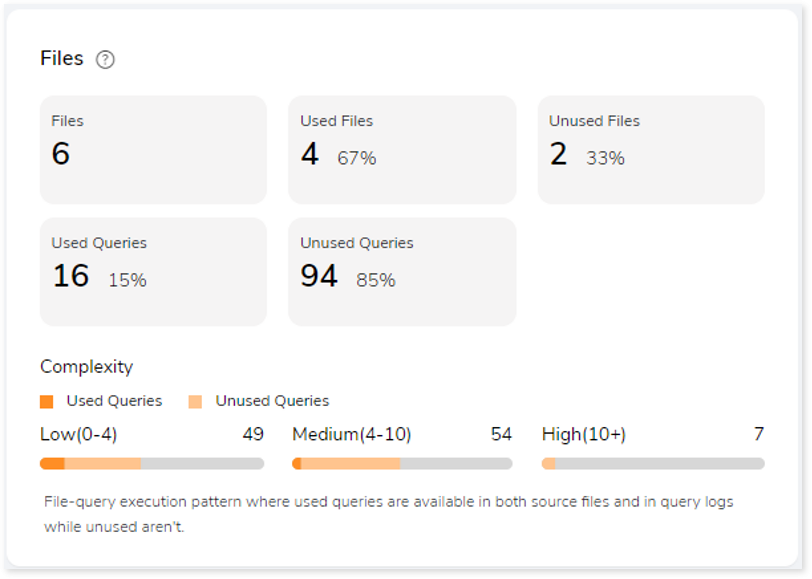
  • Files: The total number of files available in the source file.
  • Used Files: Displays the number of files where used queries are available in both DML scripts and Execution logs.
  • Unused Files: Displays the number of files where used queries are not available in both DML scripts and Execution logs.
  • Used Queries: Displays the number of queries that are used in both DML scripts and Execution logs.
  • Unused Queries: Displays the number of queries that are used in DML scripts but not in Execution logs.

Orchestration Inventory

This section provides orchestration details including the total number of job input files, jobs, files used from those jobs and so on. A job is a set of tasks that control the system for scheduling, monitoring, and reporting.

Job types include schedulers or orchestration scripts, like:

  • AutoSys: AutoSys is an automated job control system designed to schedule tasks. You can create jobs in Autosys as JIL (Job Information Language) format.
  • Control-M: Control-M is a workflow orchestration solution by which you can manage workflow for data and applications on-premises or in the cloud.
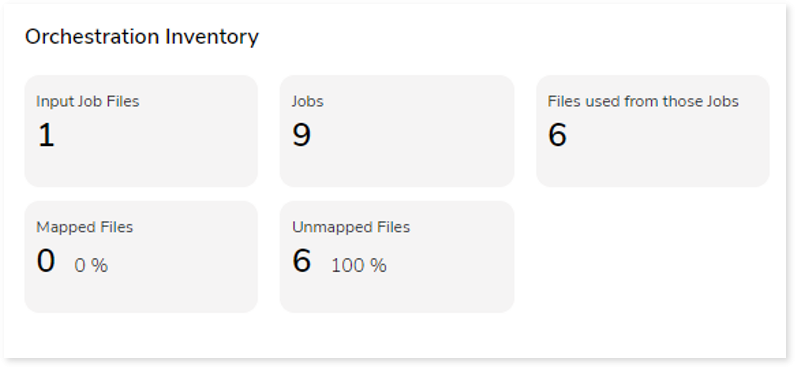
  • Input Job Files: Total number of job files.
  • Jobs: A job is a set of tasks that control the system for scheduling, monitoring, and reporting. It can be in the form of any command, file, or script.
  • Files used from those jobs: Displays the number of DML files that are called by the Job scripts.
  • Mapped Files: If the jobs and input source files are the same and can be mapped, they are referred to as mapped files.
  • Unmapped Files: If the jobs and input source files are different and unable to map, they are referred to as unmapped files.

Queries

It displays a synopsis of the analyzed queries with information about unique text, unique pattern queries as well as analyzed and unanalyzed queries.
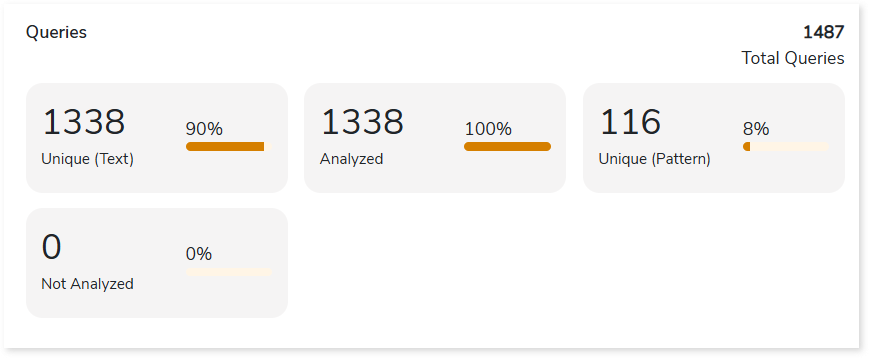
  • Unique (Text): Displays the number of unique queries.
  • Unique (Pattern): Displays the number of unique query patterns. It identifies the distinct query structures, but the query structure’s values may change.
  • Analyzed: Displays the number of analyzed queries.
  • Not Analyzed: Displays the number of not analyzed queries.

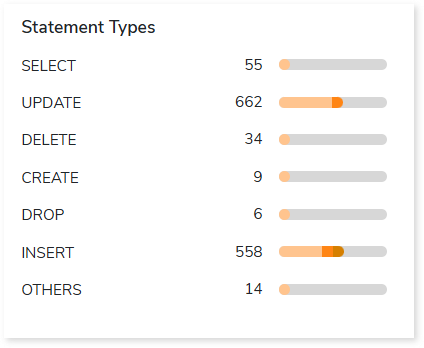
Statement Types

This section displays a summary of analyzed queries categorized by distinct query statement types in the input source file.
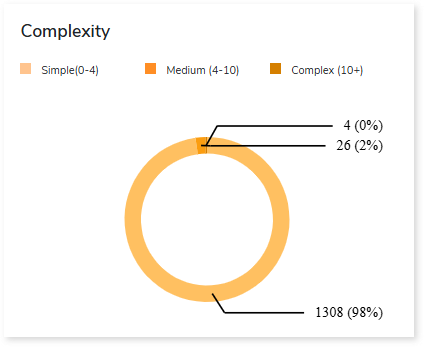
Complexity

This section provides a summarized graphical representation of query complexity that helps in making different decisions, including budget estimation.

Complexity TypeComplexity RangeDescription
Low0-4Handled directly by the tool, it requires no manual effort.
Medium4-10Most of the queries can be converted directly by the tool, and some require minimum manual effort.
High10+Complexity is high and requires more manual effort to handle.

Entities

This section provides a synopsis of the analyzed entities with information regarding the Tables and Views in the source file.
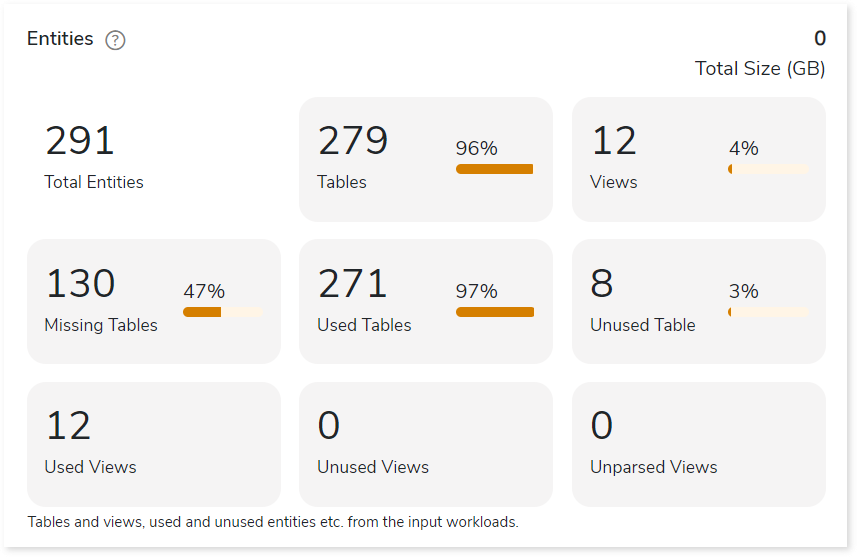
  • Tables: Displays number of tables.
  • Views: Displays number of views.
  • Missing Tables: Tables which are used in DML scripts/ query logs, but no DDL scripts are associated with them.
  • Used Tables: Tables which are used in DML scripts/ query logs.
  • Unused Tables: Tables which are used in DDL scripts but not used in DML scripts/ query logs.
  • Used Views: Displays the number of used views.
  • Unused Views: Displays the number of unused views.
  • Unparsed Views: Displays the number of unparsed views.

Entity Usage Type

This section provides information about the analyzed entities sorted by different entity usage types.
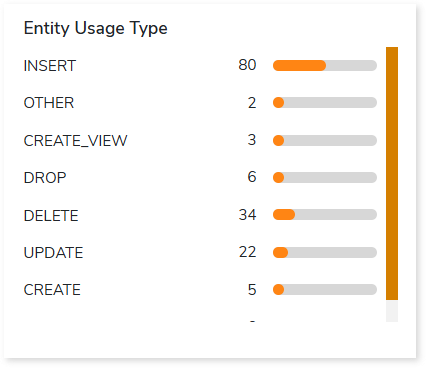
Table Type

This section provides summary of queries segregated by the break-up of table types. Table types are categorized according to the different statement types available in the input workload.
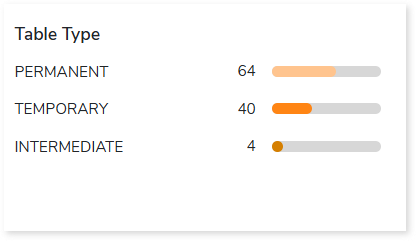
  • Permanent: In DML, if the encountered statement types such as READ, UPDATE, and INSERT are considered permanent tables. For instance, tables that are created and perform actions but are not deleted are permanent tables.
  • Intermediate: If the statement type CREATE is encountered, it refers to an intermediate table, or whenever a table is created and no actions are being performed, it is considered an intermediate table.
  • Temporary: If the statement type CREATE and DROP are encountered, they refer to a temporary table. In other words, a table that is created and then deleted is considered a temporary table.

Target-specific Optimization

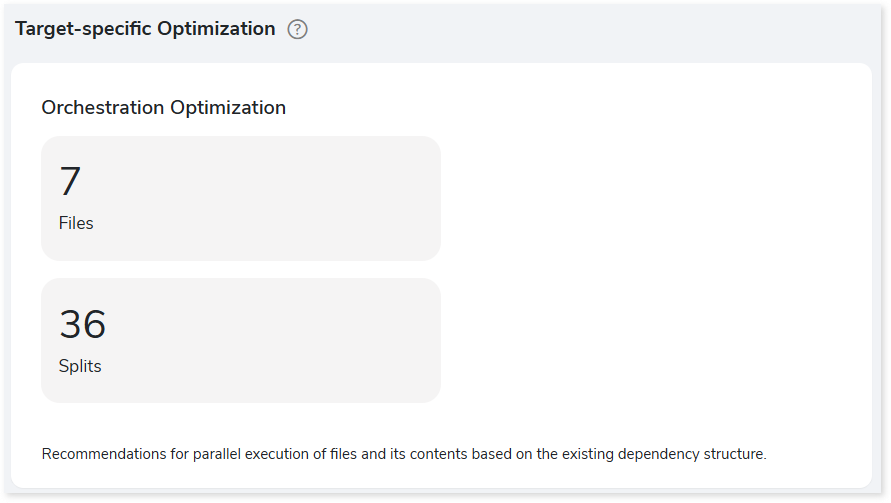
This section provides target optimization recommendations at the schema, and orchestration levels. Schema Optimization focuses on efficient schema design and effective data retrieval. Orchestration Optimization provides information about the parallel execution of files based on their dependency structure.
Note:

Schema Optimization techniques vary based on the target platform:

  • AWS/ Hadoop/ Spark: Based on Cluster By and Partition By keys.
  • Amazon Redshift: Based on Sort Key and Dist Key.

  • Databricks: Based on Cluster By Key.

    Stored Procedure

    Files

    This section provides information about input source files including procedures, functions, and queries.

    • Files: Displays the number of input source files (stored procedures).
    • Functions: Displays the number of functions.
    • UDFs: Displays the number of User-defined functions.
    • Automation: Automation refers to the extent of automated transformation possible for the given source files.

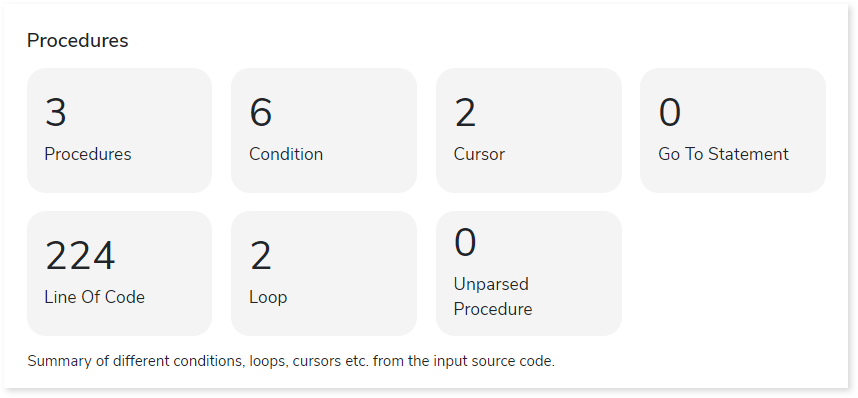
    Procedures

    This section provides a summary of analyzed procedures which includes details about its content such as condition, cursor, loop, and more.
    Queries

    It displays a synopsis of the analyzed queries.
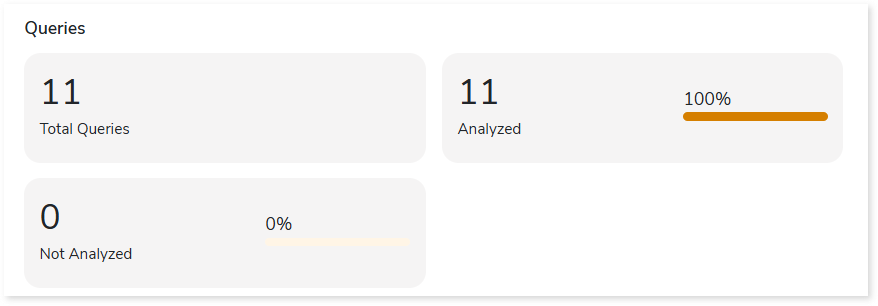
    • Total Queries: Displays total number of queries in the source file (stored procedures).
    • Analyzed: Displays the number of queries that meet the analysis criteria.
    • Not Analyzed: Displays the number of queries that did not meet the analysis criteria.

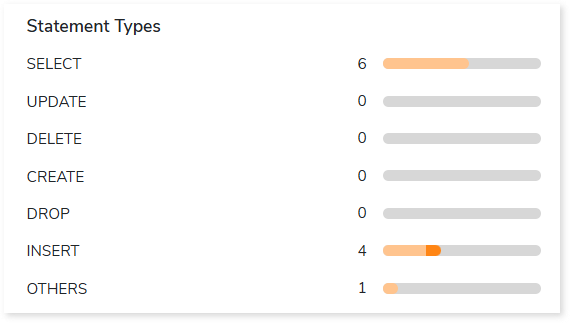
    Statement Types

    This section displays a summary of analyzed queries categorized by distinct query statement types in the input source file.
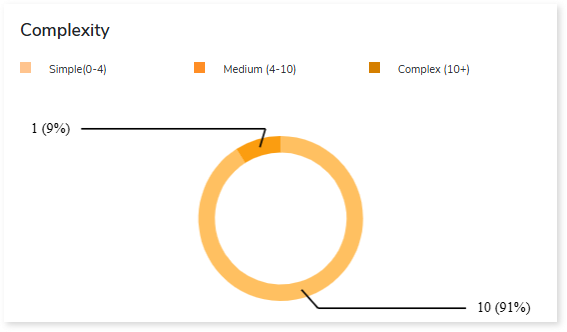
    Complexity

    This section provides a summarized graphical representation of queries’ complexity that helps in making different decisions, including budget estimation.
    Entities

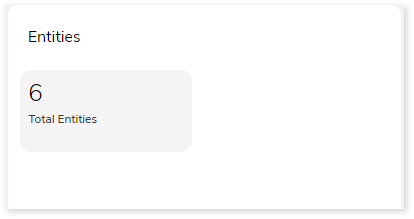
    This section provides a synopsis of the analyzed entities with information regarding the Tables and Views in the source file.


    ETL Workloads

    Summary

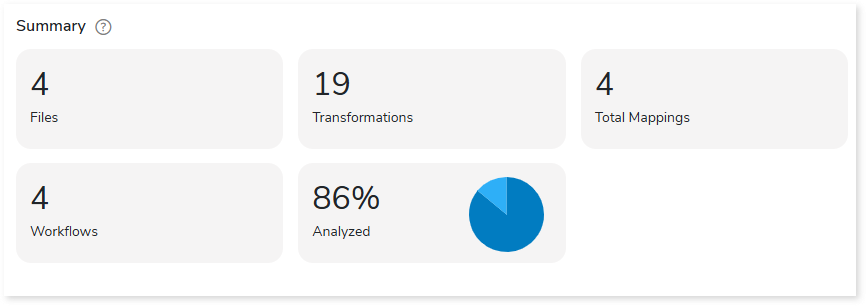
    This section illustrates the input informatica graphs that were analyzed throughout the various workflows and components. Here, you can see the number of files, transformations, mappings and workflows as well as the analyzed percentage of the workloads.
    Scheduler

    Schedulers monitor and execute tasks or jobs at a specific time.
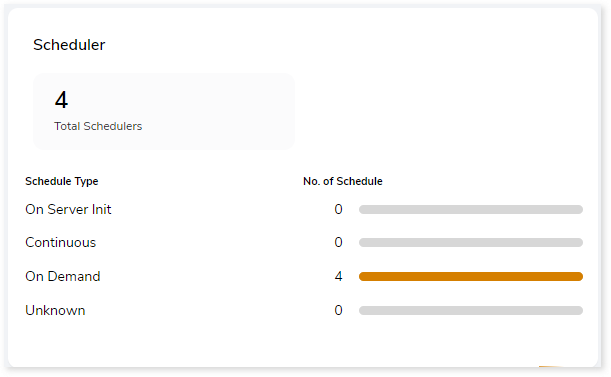
    • On Server Init: The jobs are triggered based on the availability of the server.
    • Continuous: Jobs that are continuously executed based on a scheduled time.
    • On Demand: Jobs that are triggered manually for execution.
    • Unknown: Jobs that do not belong to the above categories.

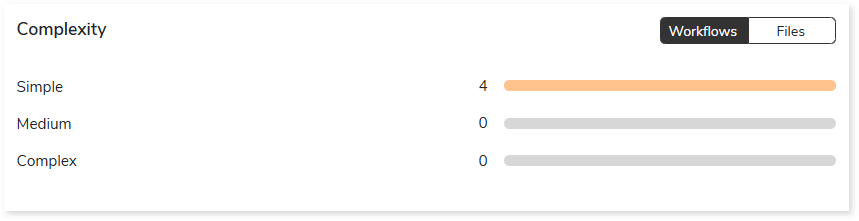
    Complexity

    This section provides a summarized graphical representation of the classification of Informatica files and workflows based on a detailed complexity assessment. This information is required to make different decisions, including migration planning, estimating budget etc.

    BI Workloads

    Summary

    This section illustrates the input Tableau scripts that were analyzed across the various components. Here, you can see the number of files, data sources, databases, and so on.

    • Files: Displays the total number of input files.
    • Data Sources: Displays the number of data sources.
    • Databases: Displays the number of databases.
    • Dashboards: Displays the number of dashboards.
    • Entities: Displays the number of entities.
    • Sets: Displays the number of sets.
    • Analyzed: Displays the percentage of workloads that have been analyzed.
    • Target Platform: Displays the name of the target platform.

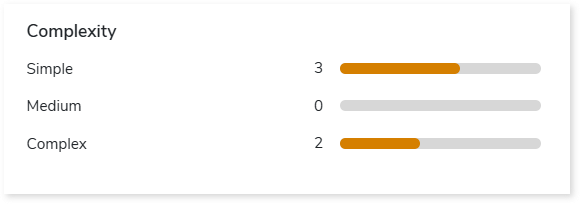
    Complexity

    This section provides a summarized graphical representation of the classification of the Tableau files based on complexity. This information is required to make various decisions, including migration planning, and estimating the budget.
    Worksheets

    This section provides information about the worksheets used in the dashboard. Worksheets are sheets in the workbook where data is represented in a visual format. Here, you can see the total number of worksheets, used and unused worksheets.
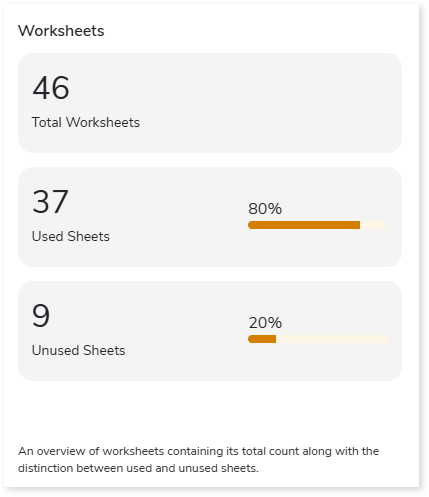
    • Total Worksheets: Displays the total number of worksheets.
    • Used Sheets: Displays the number of used sheets. Used sheets are worksheets that are used in the dashboard. In other words, a worksheet is considered as used sheet, if its visuals are added in the dashboard.
    • Unused sheets: Displays the number of unused sheets. Unused sheets are worksheets that are not used in the dashboard. In other words, a worksheet is considered as unused sheet, if its visuals are not added in the dashboard.

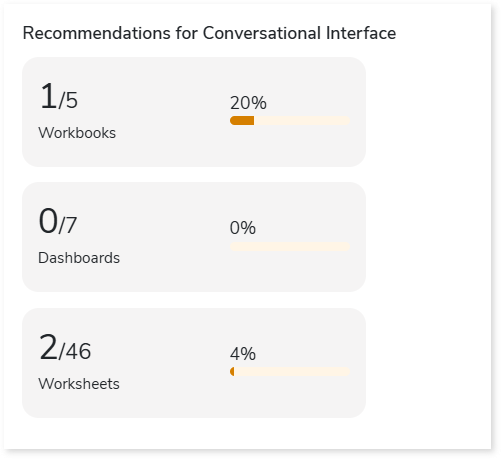
    Recommendations for Conversational Interface

    This section displays recommendations based on hierarchical structure for different report elements such as workbooks, dashboards, and worksheets. These insights help optimize scope and cost.
    Queries

    This section displays details of the queries including the number of analyzed, unique, and unanalyzed queries along with the complexity distribution.

    • Analyzed: Displays the number of analyzed queries.
    • Unique Queries: Displays the number of unique queries.
    • Not Analyzed: Displays the number of unanalyzed queries.
    • Complexity: Displays the query complexity.

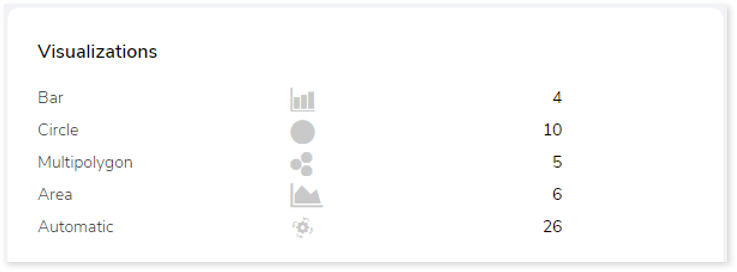
    Visualizations

    This section displays graphical visualization used in the scripts such as graphs, charts etc. This visual representation of data makes it easy to understand the data.
    Columns

    This section provides details about the columns in the entities including the total number of columns, number of calculated columns, columns usage type and the number of columns present in it.
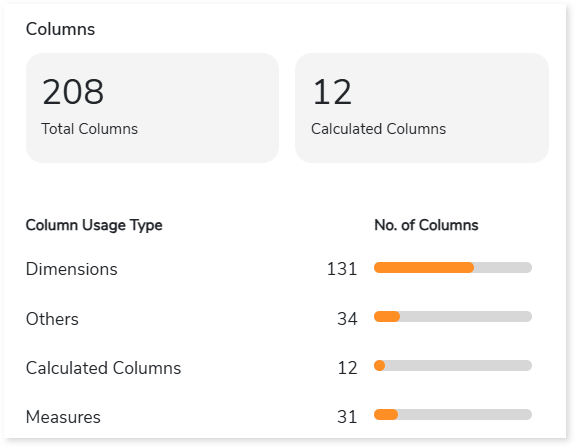
    • Total Columns: Total number of columns available in the entities.
    • Calculated columns: Columns in which functions or operations such as min, max, sum, avg, etc. are implemented for calculation.
    • Columns Usage Type: There are two types of columns:
      • Dimensions: Holds qualitative values.
      • Measures: Holds numeric values.

    Actions

    This section provides details about the actions (navigation, filters, URL, etc.) that are performed on the worksheet or dashboard. It allows you to interact with data such as navigation.
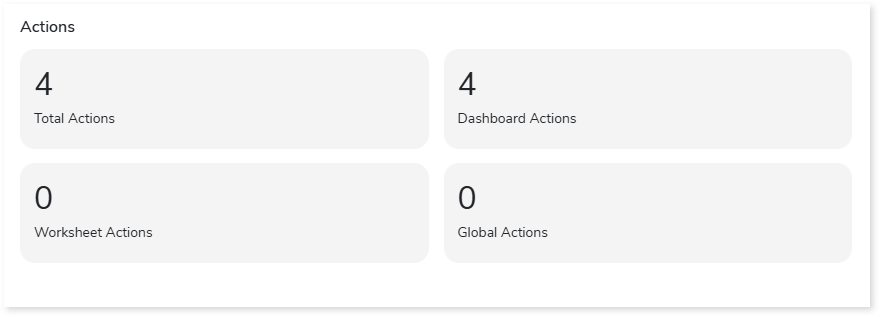
    • Total Actions: Total number of actions (filters, URL, etc.) in the report.
    • Dashboard Actions: Displays the number of dashboard actions. Dashboard actions are actions that are performed in the dashboard such as navigation, filters, URL, etc.
    • Worksheet Actions: Displays the number of worksheet actions. Worksheet actions are actions that are performed in the worksheet such as navigation, filters, URL, etc.
    • Global Actions: Displays the number of global actions. global actions are actions (filters, url, etc.) that are applied to worksheets or dashboards across the workbook.

    Filters

    This section provides information about the filters. It is a process of filtering out the data to minimize the data set size, remove irrelevant records, etc.
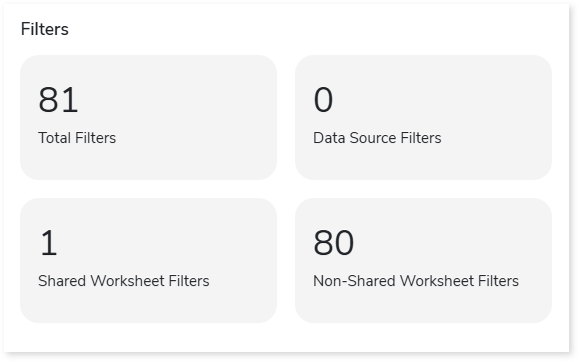
    • Total Filters: Displays the total number of filters present in the input artifacts.
    • Data Source Filters: Displays the number of filters that are applied to the data sources.
    • Shared Worksheet Filters: Displays the number of filters that are applied to the shared worksheets.
    • Non-Shared Worksheet Filters: Displays the number of filters that are applied to the non-shared worksheets.

    Orchestration Workloads

    Summary

    This section summarizes the input AutoSys scripts, including the number of files, boxes, jobs, and so on.
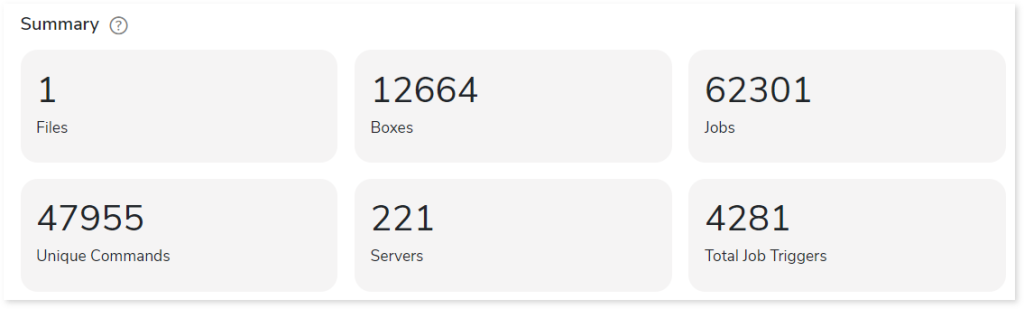
    • Files: Number of input source files.
    • Boxes: A box job is a container for multiple jobs. It controls scheduling, monitoring, and executing tasks.
    • Jobs: Controls the system for scheduling, monitoring, and executing tasks.
    • Unique Commands: Displays the number of unique commands.
    • Servers: Displays the number of database servers where the AutoSys job details are stored.
    • Total Job Triggers: Displays the total number of triggers.

    Job Type

    This section provides comprehensive information about Autosys job types along with its counts.
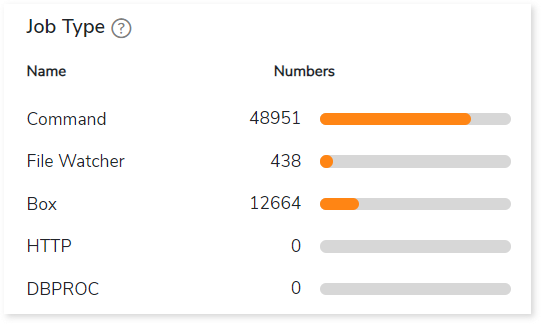
    • Command: Used to execute workloads.
    • File Watcher: Used to keep track of the presence and size of files.
    • Box: A box job is a container for multiple jobs.
    • HTTP: Used to invoke HTTP services.
    • DBPROC: Used to execute database stored procedures.

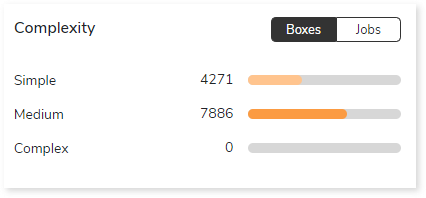
    Complexity

    This section provides a summarized graphical representation of the complexity of jobs and boxes that helps in making different decisions, including budget estimation and assessing the effort required to transform the workloads.
    Job Trigger Frequency

    This section provides information about triggers, including the total number of triggers, frequency (such as daily, weekly, and others), and the count of scheduled triggers.
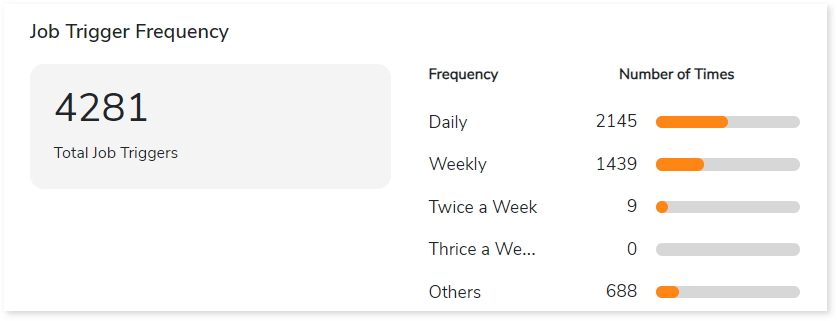
    • Total Job Triggers: Displays the total number of triggers.
    • Frequency: Displays the frequency of jobs such as daily, weekly, twice a week, etc., along with the number of triggers.

    Watch Files

    This section provides comprehensive information about watch files, including the total number of watch files, types, and its count.
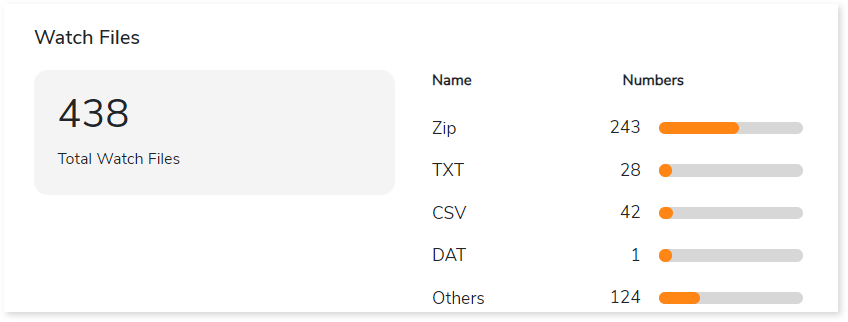
    • Total Watch Files: Displays the total number of watch files.
    • Name: Displays top 5 watch file types such as Zip, TXT, CSV, etc., along with its count.


    Analytics Workloads

    Summary

    This section illustrates the SAS based analytical scripts that were analyzed across the various elements. It provides details such as the number of files, macros, data steps, the percentage of code analyzed successfully, duplicity-related information, and more.
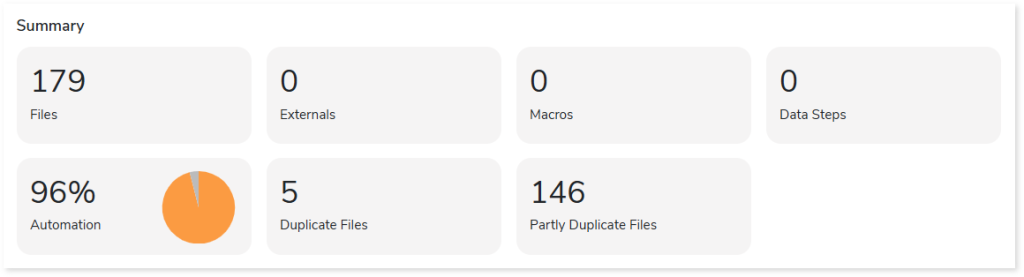
    • Files: Displays the total number of input files.
    • Externals: Displays the number of external files.
    • Macros: Displays the number of macros.
    • Data Steps: Displays the number of data steps.
    • Automation: Displays the anticipated automation conversion percentage.
    • Duplicate Files: Displays the number of duplicate files present in the input files.
    • Partly Duplicate Files: Displays the number of partially duplicate files present in the input files.

    Complexity

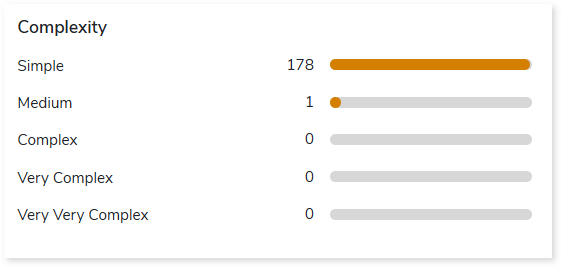
    This section provides a summarized graphical representation of the complexity of SAS scripts that helps in making different decisions, including budget estimation. The complexity of the SAS script is calculated based on various parameters like external access, conditional procedural statement, external resources, total SQL statement, and procedures.
    SAS PROC Categorization

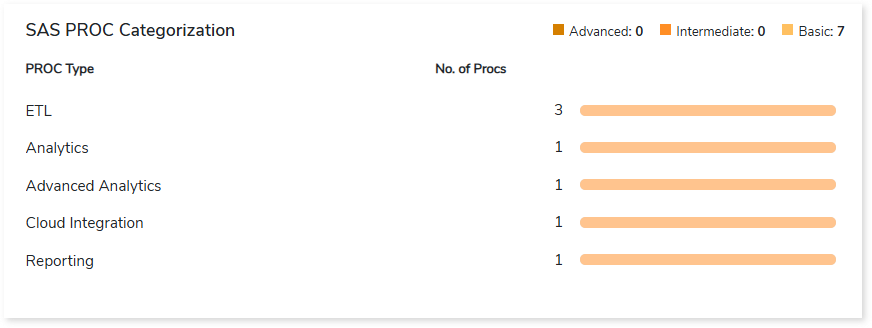
    This section provides an overview of different types of SAS PROCs, categorized as basic, intermediate, and advanced depending on their level of sophistication.
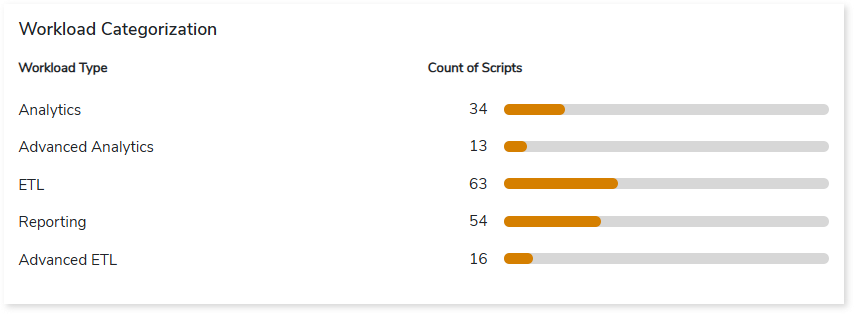
    Workload Categorization

    This section provides information about the categorization of SAS code based on the workload types such as ETL, analytics, reporting, etc.
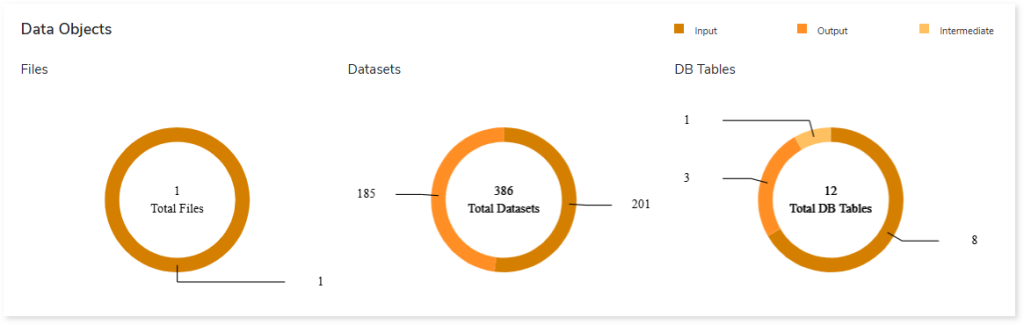
    Data Objects

    This section provides an overview of total files, datasets, and database tables along with their categorization.
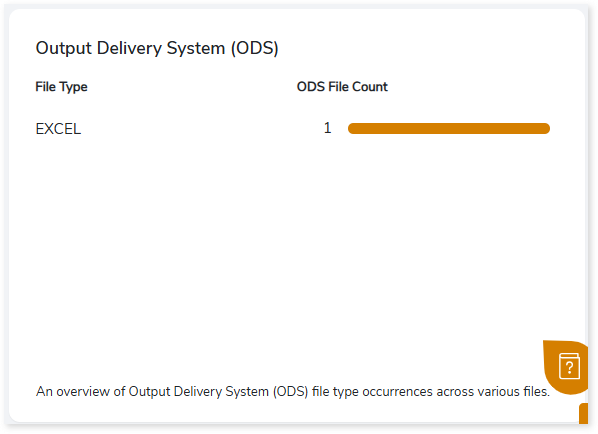
    Output Delivery System (ODS)

    This section provides an overview of the Output Delivery System (ODS) file type, including its occurrences across various files.

    To learn more, contact our support team or write to: info@leaplogic.io

    Copyright © 2026 Impetus Technologies Inc. All Rights Reserved

    • Terms of Use
    • Privacy Policy
    • License Agreement
    To the top ↑ Up ↑