Skip to the content
LeaplogicLeaplogic
  • Home
  • About Us
  • Contact
SIGN IN
  • Home
  • About Us
  • Contact

  • Getting Started
    • Before You Begin
    • Creating an Account
    • Logging into LeapLogic
    • Reset Password
    • Quick Tour of the Web Interface
    • LeapLogic in 15 minutes
      • Prerequisites
      • Step 1. Log into LeapLogic
      • Step 2. Create Assessment and Get Insights
      • Step 3. Create Transformation Pipeline and See Results
      • Step 4. Edit or Optimize the Transformed Code
      • Step 5: Complete the Transformation Lifecycle
  • Introduction to LeapLogic
    • Overview
    • High Level Architecture
    • Supported Legacy and Cloud Platforms
    • Key Features
  • LeapLogic Deployment Architecture & Prerequisites
  • Impetus LeapLogic Catalog
    • Overview
    • Dashboard
    • Enterprise Metadata Catalog
      • Managing Data Catalog
      • Creating Repo (Repository)
      • Creating DS (Data Source)
    • Entity-Relationship (ER) Model
    • Metadata Sync
      • Default Initial Import
      • On-Demand Sync
    • Agentic AI-Led PII Detection
    • Agentic AI-Led Description
    • Agentic AI-Led Domain Mapping
    • Sensitivity Stewardship
    • Semantic Harmonization
    • Data Product
      • Home
      • Classification
        • Medallion Architecture
        • Data Mesh Architecture
        • Medallion + Data Mesh Architecture
      • Data Product Builder
      • Enterprise Data Products
    • AI-Powered Metadata Assistant
    • Enterprise Process Catalog
    • Tag Management
    • Business Glossary
    • Domains
    • Role-Based Access Control (RBAC)
  • Impetus LeapLogic Lineage
    • Overview
    • Creating Lineage - Deterministic Engine
      • Prerequisites
      • Step 1. Provide Primary Inputs
      • Step 2. Add the Additional Inputs
      • Step 3. Update the Source Configuration
    • Creating AI-Powered Lineage
    • Exploring Lineage Map
    • Column-Level Lineage
      • Manage Lineage
    • Reports
    • Report - Deterministic Engine
      • Integrated Lineage (EDW, ETL, Orchestration, BI, Analytics)
        • Lineage
        • Highlights
        • Analysis
        • Optimization
        • Conversational Explorer
        • Downloadable Reports
    • Report - AI-Powered Lineage
      • Stored Procedure
        • Highlights
        • Downloadable Reports
      • Mainframe
        • COBOL
          • Highlights
          • Downloadable Reports
        • JCL
          • Highlights
          • Downloadable Reports
        • Easytrieve
          • Highlights
          • Downloadable Reports
      • ETL
        • SAP BODS
          • Highlights
          • Downloadable Reports
    • AI-Powered Wave Planning
    • AI-Powered Conversational Lineage Explorer
    • Downloadable Reports
    • Target System Lineage
      • Databricks Lakehouse
        • Lineage
        • Downloadable Reports
      • Databricks Notebook
        • Lineage
        • Highlights
        • Downloadable Reports
    • AI Implementation Readiness Assessment
    • Risk & Impact Analysis
    • Key Benefits
  • Impetus LeapLogic Certify
    • Configuring Validation Stage
      • Data Validation
        • Table
        • File
        • File and Table
        • Cell-by-cell validation
      • Query Validation
        • Query Validation (When Data is Available)
        • Query Validation (When Data is Not Available)
      • Schema Validation
    • Validation Report
      • Data
        • File
        • Table
        • File and Table
      • Query
        • Query Validation Report (When Data is Available)
        • Query Validation Report (When Data is not Available)
      • Schema
  • Workload Assessment
    • Overview
    • Value Proposition
    • Creating Assessment
      • Prerequisites
      • Step 1. Provide Primary Inputs
        • Automation Coverage
      • Step 2. Add the Additional Inputs
        • Table Stat Extraction Steps
          • Teradata
          • Oracle
          • Netezza
      • Step 3. Update the Source Configuration
      • Step 4. Configure the Recommendation Settings
    • Creating AI-Powered Assessment
    • Assessment Listing
    • Understanding Insights and Recommendations
      • Volumetric Info
      • EDW
        • Oracle
          • Highlights
          • Analysis
          • Optimization
          • Lineage
          • Recommendations
          • Downloadable Reports
        • Vertica
          • Highlights
          • Analysis
          • Optimization
          • Lineage
          • Recommendations
          • Downloadable Reports
        • Snowflake
          • Highlights
          • Analysis
          • Optimization
          • Lineage
          • Recommendations
          • Downloadable Reports
        • Azure Synapse
          • Highlights
          • Analysis
          • Optimization
          • Lineage
          • Recommendations
          • Downloadable Reports
        • SQL Server
          • Highlights
          • Analysis
          • Optimization
          • Lineage
          • Recommendations
          • Downloadable Reports
        • Teradata
          • Highlights
          • Analysis
          • Optimization
          • Lineage
          • Recommendations
          • Downloadable Reports
        • Netezza
          • Highlights
          • Analysis
          • Optimization
          • Lineage
          • Recommendations
          • Downloadable Reports
        • Google Big Query
          • Highlights
          • Analysis
          • Optimization
          • Lineage
          • Recommendations
          • Downloadable Reports
        • Redshift
          • Highlights
          • Analysis
          • Optimization
          • Lineage
          • Recommendations
          • Downloadable Reports
        • PostgreSQL
          • Highlights
          • Analysis
          • Optimization
          • Lineage
          • Recommendations
          • Downloadable Reports
        • Duck DB
          • Highlights
          • Analysis
          • Optimization
          • Lineage
          • Recommendations
          • Downloadable Reports
        • ClickHouse
          • Highlights
          • Analysis
          • Optimization
          • Lineage
          • Recommendations
          • Downloadable Reports
        • Exasol
          • Highlights
          • Analysis
          • Optimization
          • Lineage
          • Recommendations
          • Downloadable Reports
        • DB2
          • Highlights
          • Analysis
          • Optimization
          • Recommendations
          • Lineage
          • Downloadable Reports
        • SAP HANA
          • Highlights
          • Analysis
          • Lineage
          • Downloadable Reports
      • ETL
        • Informatica
          • Highlights
          • Analysis
          • Lineage
          • Downloadable Reports
        • Ab Initio
          • Highlights
          • Analysis
          • Lineage
          • Downloadable Reports
        • DataStage
          • Highlights
          • Analysis
          • Lineage
          • Downloadable Reports
        • Talend
          • Highlights
          • Analysis
          • Lineage
          • Downloadable Reports
        • SSIS
          • Highlights
          • Analysis
          • Lineage
          • Downloadable Reports
        • Informatica BDM
          • Highlights
          • Analysis
          • Lineage
          • Downloadable Reports
        • Oracle Data Integrator
          • Highlights
          • Analysis
          • Downloadable Reports
        • Pentaho
          • Highlights
          • Analysis
          • Downloadable Reports
        • Azure Data Factory
          • ARM Template
          • Highlights
          • Analysis
          • Downloadable Reports
        • Matillion
          • Highlights
          • Analysis
          • Downloadable Reports
        • SnapLogic
          • Highlights
          • Analysis
          • Downloadable Reports
      • Orchestration
        • AutoSys
          • Highlights
          • Analysis
          • Downloadable Reports
        • Control-M
          • Highlights
          • Analysis
          • Lineage
          • Downloadable Reports
        • SQL Server
          • Highlights
          • Analysis
      • BI
        • OBIEE
          • Highlights
          • Analysis
          • Lineage
          • Downloadable Reports
        • Tableau
          • Highlights
          • Analysis
          • Lineage
          • Downloadable Reports
        • IBM Cognos
          • Highlights
          • Analysis
          • Downloadable Reports
        • MicroStrategy
          • Highlights
          • Analysis
          • Lineage
          • Downloadable Reports
        • Power BI
          • Highlights
          • Analysis
          • Lineage
          • Downloadable Reports
        • SSRS
          • Highlights
          • Analysis
          • Downloadable Reports
        • SAP BO
          • Highlights
          • Analysis
          • Lineage
          • Downloadable Reports
        • WebFOCUS
          • Highlights
          • Analysis
          • Downloadable Reports
      • Analytics
        • SAS
          • Highlight
          • Analysis
          • Lineage
          • Downloadable Reports
        • Alteryx
          • Highlights
          • Analysis
          • Lineage
          • Downloadable Reports
      • Shell
        • Highlights
        • Analysis
        • Lineage
        • Downloadable Reports
      • Integrated Assessment (EDW, ETL, Orchestration, BI)
        • Highlights
        • Analysis
        • Optimization
        • Lineage
        • Recommendations
    • AI‑Powered Assessment Report
      • Mainframe
        • COBOL
        • JCL
      • Stored Procedure
    • Managing Assessment Reports
      • Downloading Report
      • Input Report Utility
      • View Configuration
    • Lineage - Dependency Analysis
    • Column-Level Lineage
      • Manage Lineage
    • AI-Powered Wave Planning
    • Complexity Calculation Logic
    • Key Benefits
    • Ad hoc Query
  • Script/ Query Log/ Code Extraction Prerequisites
    • Cloud
      • Azure Data Factory
      • Snowflake
      • Azure Synapse
      • Google BigQuery
      • Redshift
      • Azure SQL Database Hyperscale
      • Aurora PostgreSQL
    • EDW
      • Oracle
      • Netezza
      • Teradata
      • Vertica
      • SQL Server
      • Db2
      • MySQL
      • PostgreSQL
    • ETL
      • DataStage
      • Informatica
      • SSIS
      • Talend
      • ODI
      • IICS
      • DBT
      • Pentaho
      • Matillion
      • SnapLogic
      • Ab Initio
      • SAP BODS
      • TAC
      • WebFOCUS
    • BI
      • IBM Cognos
      • OBIEE
      • Tableau
      • Metabase
      • MicroStrategy
      • PowerBI
      • LeapLogic Utility for SAP BO
      • SAP BO Universe and Web Intelligence
      • SSRS
    • Analytics
      • SAS
      • Alteryx
    • Orchestration
      • AutoSys
      • Control-M
      • SQL Server
    • Mainframe
  • Batch Processing using Pipeline
    • Introduction
    • Designing Pipeline
      • How to create a pipeline
    • Key Features
      • How to schedule a pipeline
      • Configuring Parameters
    • Overview of Pipeline Report
    • Pipeline Listing
    • Reports and Insights
      • Common Model
    • Automation Level Indicator
      • ETL
        • Informatica
        • Matillion
        • DataStage
        • Informatica BDM
        • SnapLogic
        • IICS
        • Ab Initio
        • SSIS
        • Talend
        • Pentaho
      • Orchestration
        • AutoSys
        • Control-M
      • EDW
      • Analytics
        • SAS
        • Alteryx
      • BI
      • Shell Script
    • Error Specifications & Troubleshooting
  • Migration
    • Configuring Migration Stage
      • Schema Optimization
    • Migration Report
  • Transformation
    • Configuring Transformation Stage
      • On-premises to Cloud
      • Cloud-to-Cloud
        • Assigning Roles
        • Set Up Data Sources for AI
      • AI Augmentation
    • Transformation Report
      • On-premises to Cloud
      • Cloud-to-Cloud
  • ETL Conversion
    • Configuring ETL Conversion Stage
      • Ab Initio
      • Informatica
      • Informatica BDM
      • Matillion
      • DataStage
      • SSIS
      • IICS
      • Talend
      • Oracle Data Integrator
      • Pentaho
      • SnapLogic
    • ETL Conversion Report
      • Ab Initio
      • Informatica
      • Informatica BDM
      • Matillion
      • DataStage
      • SSIS
      • IICS
      • Talend
      • Oracle Data Integrator
      • Pentaho
      • SnapLogic
  • Validation
    • Configuring Validation Stage
      • Data Validation
        • Table
        • File
        • File and Table
        • Cell-by-cell validation
      • Query Validation
        • Query Validation (When Data is Available)
        • Query Validation (When Data is Not Available)
      • Schema Validation
    • Validation Report
      • Data
        • File
        • Table
        • File and Table
      • Query
        • Query Validation Report (When Data is Available)
        • Query Validation Report (When Data is not Available)
      • Schema
  • BI Conversion
    • Configuring BI Conversion Stage
      • OBIEE to Power BI
      • OBIEE to AWS QuickSight
      • Tableau to Amazon QuickSight
      • Tableau to Power BI
      • Tableau to Superset
      • Tableau to Looker
      • IBM Cognos to Power BI
      • SAP BO to Power BI
    • BI Conversion Report
      • OBIEE to Power BI
      • OBIEE to Amazon QuickSight
      • Tableau to Amazon QuickSight
      • Tableau to Power BI
      • Tableau to Superset
      • Tableau to Looker
      • IBM Cognos to Power BI
      • SAP BO to Power BI
  • Mainframe Conversion
    • Configuring Mainframe Conversion Stage
      • Cobol
      • JCL
    • Mainframe Conversion Report
      • Cobol
      • JCL
  • Orchestration Conversion
    • Configuring Orchestration Stage
      • AutoSys
      • Control-M
    • Orchestration Conversion Report
      • AutoSys
      • Control-M
  • Analytics Conversion
    • Configuring Analytics Conversion Stage
      • SAS
      • Alteryx
    • Analytics Conversion Report
      • SAS
      • Alteryx
  • Script Conversion
    • Configuring Script Conversion Stage
    • Script Conversion Report
  • Static Code Analysis
    • Configuring Static Code Analysis Stage
    • Static Code Analysis Report
  • Execution
    • Configuring Execution Stage
    • Execution Report
  • SQL Transformation
    • Overview
    • Creating and Executing the Online Notebook
      • How to Create and Execute the Notebook
      • Supported Features
    • Configuring the Notebook
      • Transformation
      • Unit Level Validation
      • Script Level Validation
    • Notebook Listing
  • Operationalization
    • Overview
      • Basic
      • Advanced
      • Cron Expression
    • Parallel Run Pipeline Listing
  • Cost Calculator
    • TCO Estimator Overview
    • Estimating the Total Cost of Ownership
    • TCO Summary
  • Transformation Source
    • Introduction
    • Creating Transformation Source Type
  • Governance
    • Summary of Governance - Roles and Permissions
    • User Creation
      • Creating a new User Account
    • Adding Roles and permissions
      • How to add Roles and Permissions to a new user?
    • Adding Group Accounts
    • Manage Quota
    • Product Usage Metrics
  • Metadata Management
    • Overview
    • Introduction to Data Catalog
      • Metadata Dashboard
      • Managing Data Catalog
        • Building Data Catalog
        • Insights to Data Catalog
        • Managing the Repository and Data Source
      • Creating Repository (Repo)
      • Creating Data Source
    • Tag Management
    • Key benefits
  • License
    • User-level Quota Deduction
    • Workload Assessment
    • EDW Conversion
    • ETL Conversion
    • BI Conversion
    • Orchestration Conversion
    • Data Migration
    • Data Validation
  • LeapLogic Desktop Version
    • Overview
    • Registration and Installation
    • Getting Started
    • Creating Assessment
      • ETL
      • DML
      • Procedure
      • Analytics
      • Hadoop
    • Reports and Insights
      • Downloadable Reports
      • Reports for Estimation
    • Logging and Troubleshooting
    • Sample Scripts
    • Desktop vs. Web Version
    • Getting Help
  • LeapLogic (Version 5.3) Deployment
    • System Requirements
    • Prerequisites
    • Deployment
      • Extracting Package
      • Placing License Key
      • Executing Deployment Script
      • Accessing LeapLogic
    • Uploading License
    • Appendix
    • Getting Help
  • LeapLogic AI – Deployment Guide
    • System Requirements
    • Prerequisites
    • Deployment
    • Getting Help
  • LeapLogic Metadata Catalog – Deployment Guide
    • System Requirements
    • Prerequisites
    • Deployment
    • Uploading License
    • Appendix
    • Getting Help
  • LeapLogic Lineage – Deployment Guide
    • System Requirements
    • Prerequisites
    • Deployment
    • Uploading License
    • Appendix
    • Getting Help
  • LeapLogic Validation – Deployment Guide
    • System Requirements
    • Prerequisites
    • Deployment
    • Uploading License
    • Appendix
    • Getting Help
  • FAQs
  • Tutorial Videos
  • Notice
  • Removed Features
    • Configuring File Validation Stage
    • Variable Extractor Stage
      • Variable Extractor Report
    • Configuring Meta Diff Stage
      • Meta Diff
    • Configuring Data Load Stage
      • Data Load
    • Configuring Multi Algo Stage
Home   »  Impetus LeapLogic Lineage  »  AI Implementation Readiness Assessment

AI Implementation Readiness Assessment

The AI Implementation Readiness Assessment evaluates how well your organization is prepared to modernize its workloads using AI. It leverages your enterprise profile and modernization context to assess AI implementation readiness through a structured, survey-based approach, generating a contextual readiness score.

Key Highlights

  • Survey-driven assessment based on enterprise, platform, and AI context
  • Evaluation across strategy, data, governance, technology, and operating model
  • Identification of foundational blockers that may limit AI adoption
  • Identification of AI implementation readiness gaps, including Legacy data and logic gap, Semantic readiness gap, and Execution readiness gap
  • Assessment of modernization readiness with AI, ensuring workloads are prepared for AI-driven transformation
  • Highlights gaps that may hinder AI-enabled modernization and require manual intervention
  • Executive readiness scoring to benchmark preparedness and risk exposure
  • Prioritized transformation roadmap with actionable recommendations

In This Topic:

  • Access AI Implementation Readiness Assessment
  • Readiness Assessment Modules
  • AI Implementation Readiness Score
  • Download AI Readiness Report


Access AI Implementation Readiness Assessment

Follow these steps to access AI implementation readiness assessment:

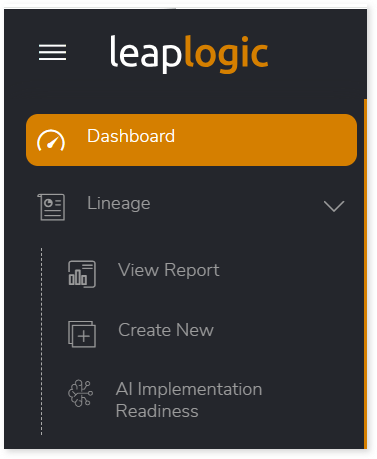
  1. Log in to Impetus LeapLogic Lineage account.
  2. From the left navigation pane, select Lineage > AI Implementation Readiness.
  1. The AI Implementation Readiness Assessment page opens. Configure the readiness profile by providing key enterprise, platform, and AI context.
  2. In Modernization Stage, select the modernization stage, such as Pre-migration / Planning Stage, Migration In Progress, or Migrated/ Cloud-Native Estate.
  3. In Industry Context, select the relevant domain (e.g., Finance, Sales, etc.).
  4. In Current/ Legacy Technology Stack, choose the existing legacy platform (e.g., Teradata, Netezza).
  5. In Target or Current AI/Data Platform, select the destination platform (e.g., AWS, Databricks).
  6. In Priority AI Use Cases, select applicable use cases aligned with the chosen industry context.
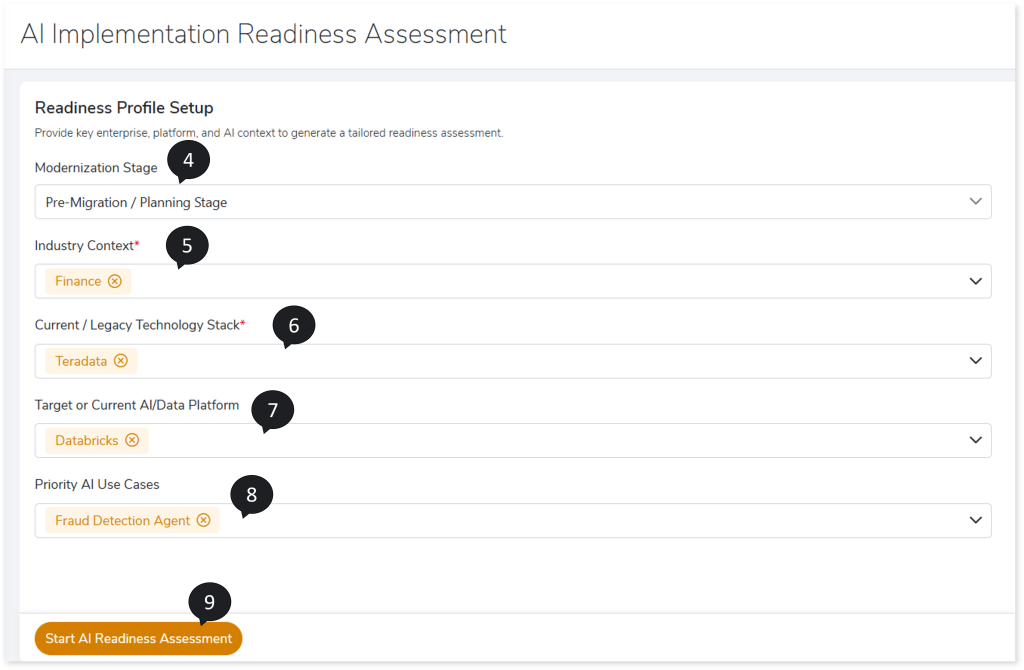
  1. Click Start AI Implementation Readiness Assessment.
  2. Upon successful creation, a confirmation message is displayed and then The Readiness Assessment Modules page opens.

  1. Based on your readiness profile, LeapLogic AI organizes relevant questions into focused assessment areas. Complete the survey by answering all questions based on your prompt, context, objective, modernization plan, impact, CEDL, and more.
  2. Click Calculate Readiness Score.
  1. The system generates the LeapLogic AI Implementation Readiness Score, which includes, modernization Readiness, identified capability gaps and foundational blockers, and more.


Readiness Assessment Modules

Based on your defined readiness profile, the system organizes the most relevant questions into focused assessment modules. Each module represents a specific capability area and contains targeted questions to evaluate readiness and identify gaps.

To ensure an accurate assessment of AI implementation readiness, you must complete all questions within each module based on your workload and enterprise context.
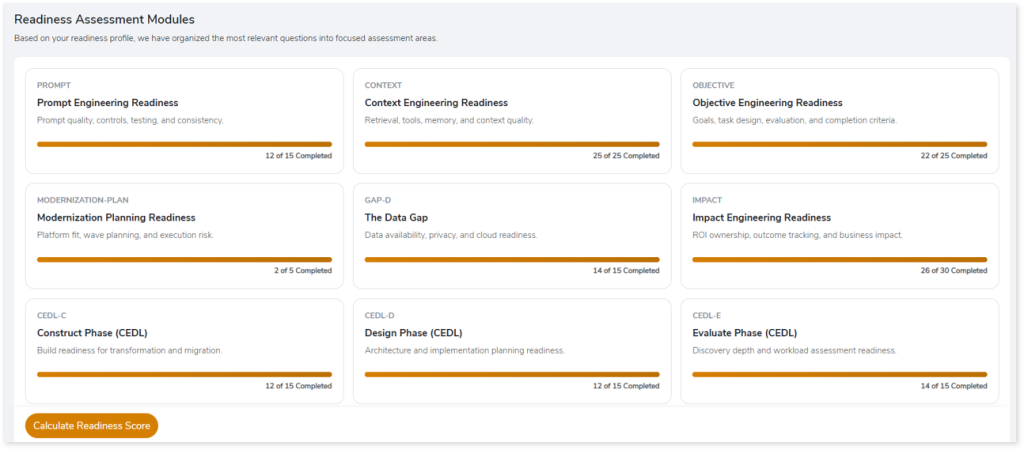
The modules include:

  • Prompt Engineering Readiness: Focuses on prompt quality, control mechanisms, testing strategies, and consistency.
  • Context Engineering Readiness: Evaluates retrieval mechanisms, tool integrations, memory handling, and overall context quality.
  • Objective Engineering Readiness: Covers goal definition, task design, evaluation criteria, and completion benchmarks.
  • Modernization Planning Readiness: Assesses platform alignment, wave-based planning, and execution risk.
  • Impact Engineering Readiness: Measures ROI ownership, outcome tracking, and overall business impact.
  • Construct Phase (CEDL-C): Build readiness for transformation and migration activities.
  • Design Phase (CEDL-D): Architecture definition and implementation planning readiness.
  • Evaluate Phase (CEDL-E): Discovery depth and workload assessment readiness.
  • Launch Phase (CEDL-L): Validation, testing, and production cutover readiness.
  • Legacy Estate Readiness (LEGACY-READINESS): Legacy system complexity, hidden business logic, and dependency mapping.
  • Enterprise AI Profile: Enterprise scale, AI ambition, and governance baseline.
  • Gap Analysis Modules: These modules specifically identify critical gaps that may impact AI-driven modernization:
    • Data Gap (GAP-D): Data availability, privacy, and cloud readiness.
    • Semantic Gap (GAP-S): Business meaning, data lineage, and metadata alignment.
    • Execution Gap (GAP-E): Operational controls required for production-scale AI execution.


AI Implementation Readiness Score

The AI Implementation Readiness Score provides a consolidated view of your organization’s readiness to modernize workloads using AI. It presents a structured snapshot of capability maturity, identifies key gaps, and outlines recommended next steps for AI-driven modernization.
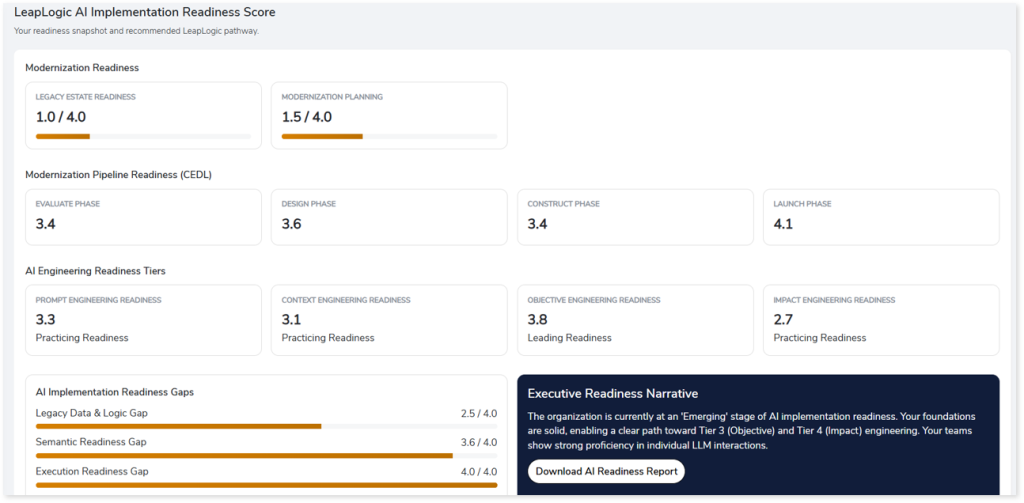
Score Overview

The readiness score is presented as a structured snapshot across the following areas:

  • Modernization Readiness: Provides an overall view of foundational readiness for AI-driven modernization, including, Legacy Estate Readiness and Modernization Planning Readiness.
  • Modernization Pipeline Readiness (CEDL): Reflects readiness across key stages of the transformation lifecycle such as Evaluate Phase, Design Phase, Construct Phase, and Launch Phase.
  • AI Engineering Readiness Tiers: Measures maturity across core AI engineering capabilities including Prompt Engineering Readiness, Context Engineering Readiness, Objective Engineering Readiness, and Impact Engineering Readiness.

Each area is presented with a score and visual indicators to help you quickly interpret readiness levels.

AI Implementation Readiness Gaps

The assessment highlights critical gaps that may impact AI-driven modernization:

  • Legacy Data & Logic Gap: Indicates challenges related to legacy systems, data structures, and embedded logic.
  • Semantic Readiness Gap: Reflects misalignment in business context, metadata, and data meaning.
  • Execution Readiness Gap: Identifies limitations in operational controls required for production-scale AI.

Addressing these gaps is essential to improve overall readiness and reduce dependency on manual intervention.

Executive Readiness Narrative

A contextual Executive Readiness Narrative summarizes your organization’s overall readiness position.

  • Provides a maturity classification (for example, Emerging, Practicing, or Leading).
  • Highlights strengths and areas of improvement.
  • Outlines progression paths across AI engineering tiers.
  • Aligns readiness insights with business impact and modernization goals.


Download AI Readiness Report

You can download a detailed report of the assessment results from the AI Implementation Readiness Score page. To download the report, click Download AI Readiness Report.
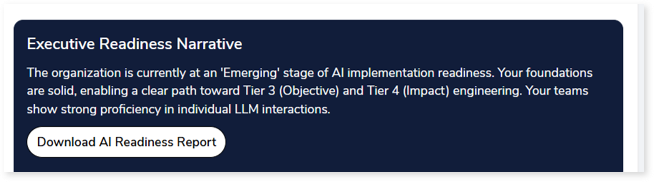
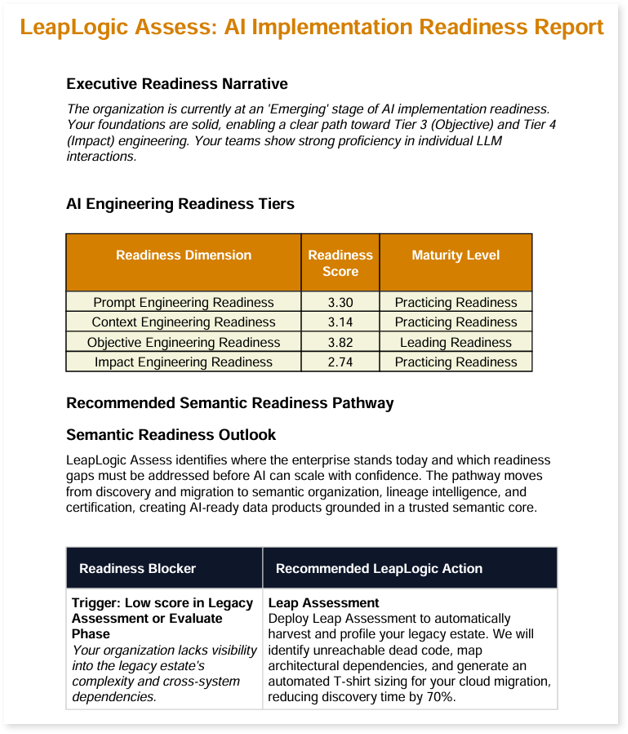
The downloaded report, LeapLogic Assess: AI Implementation Readiness Report, provides a detailed and structured view of your assessment outcomes. It includes:

  • Executive Readiness Narrative: A summary of your organization’s AI readiness stage, key strengths, and progression path across AI engineering tiers.
  • AI Engineering Readiness Tiers: A tabular view of readiness dimensions, including Prompt Engineering Readiness, Context Engineering Readiness, Objective Engineering Readiness, and Impact Engineering Readiness. Each dimension includes a readiness score and corresponding maturity level (for example, Practicing or Leading).
  • Recommended Semantic Readiness Pathway: Provides guidance on improving semantic readiness by outlining a structured progression toward AI-ready data.
  • Semantic Readiness Outlook: Describes the current state of enterprise readiness and highlights areas that need to be addressed for scalable AI adoption.
  • Readiness Blockers and Recommended Actions: Identifies key blockers (for example, low legacy assessment scores or limited visibility into dependencies) and maps them to recommended LeapLogic actions such as automated assessment, dependency mapping, and modernization planning.

To learn more, contact our support team or write to: info@leaplogic.io

Copyright © 2026 Impetus Technologies Inc. All Rights Reserved

  • Terms of Use
  • Privacy Policy
  • License Agreement
To the top ↑ Up ↑