Role-Based Access Control (RBAC)
Role-Based Access Control (RBAC) provides a structured approach to managing user access across datasets, metadata, and semantic assets. By assigning permissions based on defined roles, RBAC ensures that users can access only the data and capabilities relevant to their responsibilities.
RBAC supports fine-grained control over who can view, create, modify, or manage assets, helping organizations enforce governance policies, maintain data security, and ensure compliance—while enabling teams to collaborate efficiently within clearly defined access boundaries.
In This Topic:
Requesting Additional Roles
If you require access beyond your currently assigned roles, you can request additional roles directly from the Impetus LeapLogic Catalog. All role requests are reviewed and approved by an administrator to ensure secure and governed access.
To request additional roles:
- Log in to the Impetus LeapLogic Catalog.
- In the top‑right corner of the page, click the user profile icon (username).
- From the menu, select Request Role.
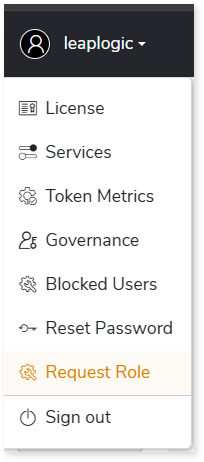
- The Request Additional Role window opens.
- In Select Roles, choose the additional roles you require.
- Click Submit.
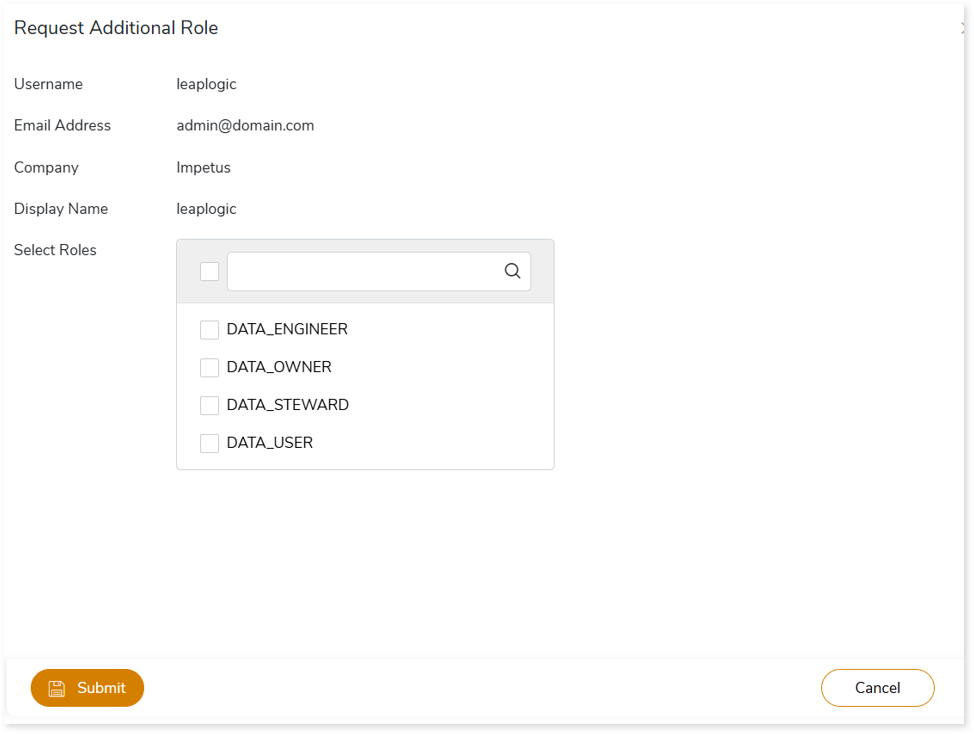
Once submitted, the role request is sent to the administrator for review.
Role Request Approval Workflow
This section describes the role approval workflow.
- The administrator reviews the role request.
- The request can be approved or rejected based on access policies.
- If approved, the requested roles are assigned to your account and become active based on applicable access policies.
 Leaplogic