Skip to the content
LeaplogicLeaplogic
  • Home
  • About Us
  • Contact
SIGN IN
  • Home
  • About Us
  • Contact

  • Getting Started
    • Before You Begin
    • Creating an Account
    • Logging into LeapLogic
    • Reset Password
    • Quick Tour of the Web Interface
    • LeapLogic in 15 minutes
      • Prerequisites
      • Step 1. Log into LeapLogic
      • Step 2. Create Assessment and Get Insights
      • Step 3. Create Transformation Pipeline and See Results
      • Step 4. Edit or Optimize the Transformed Code
      • Step 5: Complete the Transformation Lifecycle
  • Introduction to LeapLogic
    • Overview
    • High Level Architecture
    • Supported Legacy and Cloud Platforms
    • Key Features
  • LeapLogic Deployment Architecture & Prerequisites
  • Impetus Leap Catalog
    • Overview
    • Dashboard
    • Enterprise Metadata Catalog
      • Managing Data Catalog
      • Creating Repo (Repository)
      • Creating DS (Data Source)
    • Entity-Relationship (ER) Model
    • Metadata Sync
      • Default Initial Import
      • On-Demand Sync
    • Agentic AI-Led PII Detection
    • Agentic AI-Led Description
    • Agentic AI-Led Domain Mapping
    • Sensitivity Stewardship
    • Enterprise Process Catalog
    • Tag Management
  • Impetus Leap Lineage
    • Overview
    • Value Proposition
    • Creating Assessment
      • Step 1. Provide Primary Inputs
        • Configuring Automation Coverage
      • Step 2. Add the Additional Inputs
      • Step 3. Update the Source Configuration
      • Step 4. Configure the Recommendation Settings
    • Creating AI-Powered Assessment
    • Assessment Listing
    • Understanding Insights and Recommendations
      • Volumetric Info
      • EDW
        • Oracle
          • Highlights
          • Analysis
          • Optimization
          • Lineage
          • Recommendations
          • Downloadable Reports
      • ETL
        • Informatica
          • Highlights
          • Analysis
          • Lineage
          • Downloadable Reports
        • Ab Initio
          • Highlights
          • Analysis
          • Lineage
          • Downloadable Reports
        • DataStage
          • Highlights
          • Analysis
          • Lineage
          • Downloadable Reports
        • Talend
          • Highlights
          • Analysis
          • Lineage
          • Downloadable Reports
        • SSIS
          • Highlights
          • Analysis
          • Lineage
          • Downloadable Reports
        • Informatica BDM
          • Highlights
          • Analysis
          • Lineage
          • Downloadable Reports
        • Oracle Data Integrator
          • Highlights
          • Analysis
          • Lineage
          • Downloadable Reports
        • Pentaho
          • Highlights
          • Analysis
          • Downloadable Reports
        • Azure Data Factory
          • ARM Template
          • Highlights
          • Analysis
          • Downloadable Reports
        • Matillion
          • Highlights
          • Analysis
          • Lineage
          • Downloadable Reports
        • SnapLogic
          • Highlights
          • Analysis
          • Downloadable Reports
      • Orchestration
        • AutoSys
          • Highlights
          • Analysis
          • Lineage
          • Downloadable Reports
        • Control-M
          • Highlights
          • Analysis
          • Lineage
          • Downloadable Reports
        • SQL Server
          • Highlights
          • Analysis
          • Downloadable Reports
      • BI
        • OBIEE
          • Highlights
          • Analysis
          • Lineage
          • Downloadable Reports
        • Tableau
          • Highlights
          • Analysis
          • Lineage
          • Downloadable Reports
        • IBM Cognos
          • Highlights
          • Analysis
          • Lineage
          • Downloadable Reports
        • MicroStrategy
          • Highlights
          • Analysis
          • Lineage
          • Downloadable Reports
        • Power BI
          • Highlights
          • Analysis
          • Lineage
          • Downloadable Reports
        • SSRS
          • Highlights
          • Analysis
          • Lineage
          • Downloadable Reports
        • SAP BO
          • Highlights
          • Analysis
          • Lineage
          • Downloadable Reports
        • WebFOCUS
          • Highlights
          • Analysis
          • Downloadable Reports
      • Analytics
        • SAS
          • Highlights
          • Analysis
          • Lineage
          • Downloadable Reports
        • Alteryx
          • Highlights
          • Analysis
          • Lineage
          • Downloadable Reports
      • Shell
        • Highlights
        • Analysis
        • Lineage
        • Downloadable Reports
      • Integrated Assessment
        • Highlights
        • Analysis
        • Optimization
        • Lineage
        • Recommendations
    • AI‑Powered Assessment Report
      • Stored Procedure
        • Highlights
        • Downloadable Reports
      • Mainframe
        • COBOL
          • Highlights
          • Downloadable Reports
        • JCL
          • Highlights
          • Downloadable Reports
    • Managing Assessment Reports
    • Lineage - Dependency Analysis
    • Column-Level Lineage
      • Manage Lineage
    • Complexity Calculation Logic
    • Key Benefits
    • Ad hoc Query
  • Impetus Leap Certify
    • Configuring Validation Stage
      • Data Validation
        • Table
        • File
        • File and Table
        • Cell-by-cell validation
      • Query Validation
        • Query Validation (When Data is Available)
        • Query Validation (When Data is Not Available)
      • Schema Validation
    • Validation Report
      • Data
        • File
        • Table
        • File and Table
      • Query
        • Query Validation Report (When Data is Available)
        • Query Validation Report (When Data is not Available)
      • Schema
  • Workload Assessment
    • Overview
    • Value Proposition
    • Creating Assessment
      • Prerequisites
      • Step 1. Provide Primary Inputs
        • Automation Coverage
      • Step 2. Add the Additional Inputs
        • Table Stat Extraction Steps
          • Teradata
          • Oracle
          • Netezza
      • Step 3. Update the Source Configuration
      • Step 4. Configure the Recommendation Settings
    • Creating AI-Powered Assessment
    • Assessment Listing
    • Understanding Insights and Recommendations
      • Volumetric Info
      • EDW
        • Oracle
          • Highlights
          • Analysis
          • Optimization
          • Lineage
          • Recommendations
          • Downloadable Reports
        • Vertica
          • Highlights
          • Analysis
          • Optimization
          • Lineage
          • Recommendations
          • Downloadable Reports
        • Snowflake
          • Highlights
          • Analysis
          • Optimization
          • Lineage
          • Recommendations
          • Downloadable Reports
        • Azure Synapse
          • Highlights
          • Analysis
          • Optimization
          • Lineage
          • Recommendations
          • Downloadable Reports
        • SQL Server
          • Highlights
          • Analysis
          • Optimization
          • Lineage
          • Recommendations
          • Downloadable Reports
        • Teradata
          • Highlights
          • Analysis
          • Optimization
          • Lineage
          • Recommendations
          • Downloadable Reports
        • Netezza
          • Highlights
          • Analysis
          • Optimization
          • Lineage
          • Recommendations
          • Downloadable Reports
        • Google Big Query
          • Highlights
          • Analysis
          • Optimization
          • Lineage
          • Recommendations
          • Downloadable Reports
        • Redshift
          • Highlights
          • Analysis
          • Optimization
          • Lineage
          • Recommendations
          • Downloadable Reports
        • PostgreSQL
          • Highlights
          • Analysis
          • Optimization
          • Lineage
          • Recommendations
          • Downloadable Reports
        • Duck DB
          • Highlights
          • Analysis
          • Optimization
          • Lineage
          • Recommendations
          • Downloadable Reports
        • ClickHouse
          • Highlights
          • Analysis
          • Optimization
          • Lineage
          • Recommendations
          • Downloadable Reports
        • Exasol
          • Highlights
          • Analysis
          • Optimization
          • Lineage
          • Recommendations
          • Downloadable Reports
        • DB2
          • Highlights
          • Analysis
          • Optimization
          • Recommendations
          • Lineage
          • Downloadable Reports
        • SAP HANA
          • Highlights
          • Analysis
          • Lineage
          • Downloadable Reports
      • ETL
        • Informatica
          • Highlights
          • Analysis
          • Lineage
          • Downloadable Reports
        • Ab Initio
          • Highlights
          • Analysis
          • Lineage
          • Downloadable Reports
        • DataStage
          • Highlights
          • Analysis
          • Lineage
          • Downloadable Reports
        • Talend
          • Highlights
          • Analysis
          • Lineage
          • Downloadable Reports
        • SSIS
          • Highlights
          • Analysis
          • Lineage
          • Downloadable Reports
        • Informatica BDM
          • Highlights
          • Analysis
          • Lineage
          • Downloadable Reports
        • Oracle Data Integrator
          • Highlights
          • Analysis
          • Downloadable Reports
        • Pentaho
          • Highlights
          • Analysis
          • Downloadable Reports
        • Azure Data Factory
          • ARM Template
          • Highlights
          • Analysis
          • Downloadable Reports
        • Matillion
          • Highlights
          • Analysis
          • Downloadable Reports
        • SnapLogic
          • Highlights
          • Analysis
          • Downloadable Reports
      • Orchestration
        • AutoSys
          • Highlights
          • Analysis
          • Downloadable Reports
        • Control-M
          • Highlights
          • Analysis
          • Lineage
          • Downloadable Reports
        • SQL Server
          • Highlights
          • Analysis
      • BI
        • OBIEE
          • Highlights
          • Analysis
          • Lineage
          • Downloadable Reports
        • Tableau
          • Highlights
          • Analysis
          • Lineage
          • Downloadable Reports
        • IBM Cognos
          • Highlights
          • Analysis
          • Downloadable Reports
        • MicroStrategy
          • Highlights
          • Analysis
          • Lineage
          • Downloadable Reports
        • Power BI
          • Highlights
          • Analysis
          • Lineage
          • Downloadable Reports
        • SSRS
          • Highlights
          • Analysis
          • Downloadable Reports
        • SAP BO
          • Highlights
          • Analysis
          • Lineage
          • Downloadable Reports
        • WebFOCUS
          • Highlights
          • Analysis
          • Downloadable Reports
      • Analytics
        • SAS
          • Highlight
          • Analysis
          • Lineage
          • Downloadable Reports
        • Alteryx
          • Highlights
          • Analysis
          • Lineage
          • Downloadable Reports
      • Shell
        • Highlights
        • Analysis
        • Lineage
        • Downloadable Reports
      • Integrated Assessment (EDW, ETL, Orchestration, BI)
        • Highlights
        • Analysis
        • Optimization
        • Lineage
        • Recommendations
    • AI‑Powered Assessment Report
      • Mainframe
        • COBOL
        • JCL
      • Stored Procedure
    • Managing Assessment Reports
      • Downloading Report
      • Input Report Utility
      • View Configuration
    • Lineage - Dependency Analysis
    • Column-Level Lineage
      • Manage Lineage
    • Complexity Calculation Logic
    • Key Benefits
    • Ad hoc Query
  • Script/ Query Log/ Code Extraction Prerequisites
    • Cloud
      • Azure Data Factory
      • Snowflake
      • Azure Synapse
      • Google BigQuery
      • Redshift
      • Azure SQL Database Hyperscale
      • Aurora PostgreSQL
    • EDW
      • Oracle
      • Netezza
      • Teradata
      • Vertica
      • SQL Server
      • Db2
      • MySQL
      • PostgreSQL
    • ETL
      • DataStage
      • Informatica
      • SSIS
      • Talend
      • ODI
      • IICS
      • DBT
      • Pentaho
      • Matillion
      • SnapLogic
      • Ab Initio
      • SAP BODS
      • TAC
      • WebFOCUS
    • BI
      • IBM Cognos
      • OBIEE
      • Tableau
      • Metabase
      • MicroStrategy
      • PowerBI
      • LeapLogic Utility for SAP BO
      • SAP BO Universe and Web Intelligence
      • SSRS
    • Analytics
      • SAS
      • Alteryx
    • Orchestration
      • AutoSys
      • Control-M
      • SQL Server
    • Mainframe
  • Batch Processing using Pipeline
    • Introduction
    • Designing Pipeline
      • How to create a pipeline
    • Key Features
      • How to schedule a pipeline
      • Configuring Parameters
    • Overview of Pipeline Report
    • Pipeline Listing
    • Reports and Insights
      • Common Model
    • Automation Level Indicator
      • ETL
        • Informatica
        • Matillion
        • DataStage
        • Informatica BDM
        • SnapLogic
        • IICS
        • Ab Initio
        • SSIS
        • Talend
        • Pentaho
      • Orchestration
        • AutoSys
        • Control-M
      • EDW
      • Analytics
        • SAS
        • Alteryx
      • BI
      • Shell Script
    • Error Specifications & Troubleshooting
  • Migration
    • Configuring Migration Stage
      • Schema Optimization
    • Migration Report
  • Transformation
    • Configuring Transformation Stage
      • On-premises to Cloud
      • Cloud-to-Cloud
        • Assigning Roles
        • Intelligent Modernization
      • AI Augmentation
    • Transformation Report
      • On-premises to Cloud
      • Cloud-to-Cloud
  • ETL Conversion
    • Configuring ETL Conversion Stage
      • Ab Initio
      • Informatica
      • Informatica BDM
      • Matillion
      • DataStage
      • SSIS
      • IICS
      • Talend
      • Oracle Data Integrator
      • Pentaho
      • SnapLogic
    • ETL Conversion Report
      • Ab Initio
      • Informatica
      • Informatica BDM
      • Matillion
      • DataStage
      • SSIS
      • IICS
      • Talend
      • Oracle Data Integrator
      • Pentaho
      • SnapLogic
  • Validation
    • Configuring Validation Stage
      • Data Validation
        • Table
        • File
        • File and Table
        • Cell-by-cell validation
      • Query Validation
        • Query Validation (When Data is Available)
        • Query Validation (When Data is Not Available)
      • Schema Validation
    • Validation Report
      • Data
        • File
        • Table
        • File and Table
      • Query
        • Query Validation Report (When Data is Available)
        • Query Validation Report (When Data is not Available)
      • Schema
  • BI Conversion
    • Configuring BI Conversion Stage
      • OBIEE to Power BI
      • OBIEE to AWS QuickSight
      • Tableau to Amazon QuickSight
      • Tableau to Power BI
      • Tableau to Superset
      • Tableau to Looker
      • IBM Cognos to Power BI
      • SAP BO to Power BI
    • BI Conversion Report
      • OBIEE to Power BI
      • OBIEE to Amazon QuickSight
      • Tableau to Amazon QuickSight
      • Tableau to Power BI
      • Tableau to Superset
      • Tableau to Looker
      • IBM Cognos to Power BI
      • SAP BO to Power BI
  • Mainframe Conversion
    • Configuring Mainframe Conversion Stage
      • Cobol
      • JCL
    • Mainframe Conversion Report
      • Cobol
      • JCL
  • Orchestration Conversion
    • Configuring Orchestration Stage
      • AutoSys
      • Control-M
    • Orchestration Conversion Report
      • AutoSys
      • Control-M
  • Analytics Conversion
    • Configuring Analytics Conversion Stage
      • SAS
      • Alteryx
    • Analytics Conversion Report
      • SAS
      • Alteryx
  • Script Conversion
    • Configuring Script Conversion Stage
    • Script Conversion Report
  • Static Code Analysis
    • Configuring Static Code Analysis Stage
    • Static Code Analysis Report
  • Execution
    • Configuring Execution Stage
    • Execution Report
  • SQL Transformation
    • Overview
    • Creating and Executing the Online Notebook
      • How to Create and Execute the Notebook
      • Supported Features
    • Configuring the Notebook
      • Transformation
      • Unit Level Validation
      • Script Level Validation
    • Notebook Listing
  • Operationalization
    • Overview
      • Basic
      • Advanced
      • Cron Expression
    • Parallel Run Pipeline Listing
  • Cost Calculator
    • TCO Estimator Overview
    • Estimating the Total Cost of Ownership
    • TCO Summary
  • Transformation Source
    • Introduction
    • Creating Transformation Source Type
  • Governance
    • Summary of Governance - Roles and Permissions
    • User Creation
      • Creating a new User Account
    • Adding Roles and permissions
      • How to add Roles and Permissions to a new user?
    • Adding Group Accounts
    • Manage Quota
    • Product Usage Metrics
  • Metadata Management
    • Overview
    • Introduction to Data Catalog
      • Metadata Dashboard
      • Managing Data Catalog
        • Building Data Catalog
        • Insights to Data Catalog
        • Managing the Repository and Data Source
      • Creating Repository (Repo)
      • Creating Data Source
    • Tag Management
    • Key benefits
  • License
    • User-level Quota Deduction
    • Workload Assessment
    • EDW Conversion
    • ETL Conversion
    • BI Conversion
    • Orchestration Conversion
    • Data Migration
    • Data Validation
  • LeapLogic Desktop Version
    • Overview
    • Registration and Installation
    • Getting Started
    • Creating Assessment
      • ETL
      • DML
      • Procedure
      • Analytics
      • Hadoop
    • Reports and Insights
      • Downloadable Reports
      • Reports for Estimation
    • Logging and Troubleshooting
    • Sample Scripts
    • Desktop vs. Web Version
    • Getting Help
  • LeapLogic (Version 5.2) Deployment
    • System Requirements
    • Prerequisites
    • Deployment
      • Extracting Package
      • Placing License Key
      • Executing Deployment Script
      • Accessing LeapLogic
    • Uploading License
    • Appendix
    • Getting Help
  • LeapLogic AI – Deployment Guide
    • System Requirements
    • Prerequisites
    • Deployment
    • Getting Help
  • LeapLogic Metadata Catalog – Deployment Guide
    • System Requirements
    • Prerequisites
    • Deployment
    • Uploading License
    • Appendix
    • Getting Help
  • LeapLogic Lineage – Deployment Guide
    • System Requirements
    • Prerequisites
    • Deployment
    • Uploading License
    • Appendix
    • Getting Help
  • LeapLogic Validation – Deployment Guide
    • System Requirements
    • Prerequisites
    • Deployment
    • Uploading License
    • Appendix
    • Getting Help
  • FAQs
  • Tutorial Videos
  • Notice
  • Removed Features
    • Configuring File Validation Stage
    • Variable Extractor Stage
      • Variable Extractor Report
    • Configuring Meta Diff Stage
      • Meta Diff
    • Configuring Data Load Stage
      • Data Load
    • Configuring Multi Algo Stage
Home   »  Impetus Leap Catalog  »  Sensitivity Stewardship

Sensitivity Stewardship

Sensitivity Stewardship introduces a human-in-the-loop governance layer within the metadata catalog, ensuring that AI-driven sensitivity classifications remain accurate, explainable, and enterprise-aligned. While automated detection accelerates identification of sensitive attributes, data stewards play a critical role in validating, refining, and operationalizing these classifications within governed workflows.
This capability bridges automation with accountability, allowing organizations to maintain high-confidence data labeling without sacrificing scalability. By embedding stewardship controls directly into the catalog experience, it enables continuous calibration of AI models while preserving auditability and compliance posture.


Key Capabilities

The key capabilities include:

  • Steward-led review and approval of sensitive data tags to validate AI-generated classifications before propagation
  • Closed-loop feedback mechanism where steward actions directly enhance model precision and reduce false positives over time
  • Bulk approval and correction workflows to efficiently manage large volumes of detected tags across datasets
  • Comprehensive audit trails capturing who approved or modified tags, along with timestamps for compliance and traceability
  • Operational visibility into unreviewed, pending, or disputed sensitivity tags to prioritize stewardship efforts

Together, these features establish a controlled, iterative refinement cycle where AI and human expertise co-evolve, ensuring that sensitivity intelligence remains both reliable and adaptable in dynamic data environments.


In This Topic:

  • Viewing Sensitivity Stewardship
  • Review Queue
  • My Reviews
  • Approved
  • Rejected


Viewing Sensitivity Stewardship

In Sensitivity Stewardship, you can review all entities tagged as PII and verify whether the detected information is genuinely sensitive. This allows you to validate the AI-identified PII details and decide whether the classification should be approved or rejected. This review process ensures that only accurate and trustworthy PII classifications are finalized.

To access Sensitivity Stewardship:

  1. Log in to your LeapLogic Metadata Catalog account.
  2. From the left navigation pane, select Metadata > Sensitivity Stewardship.
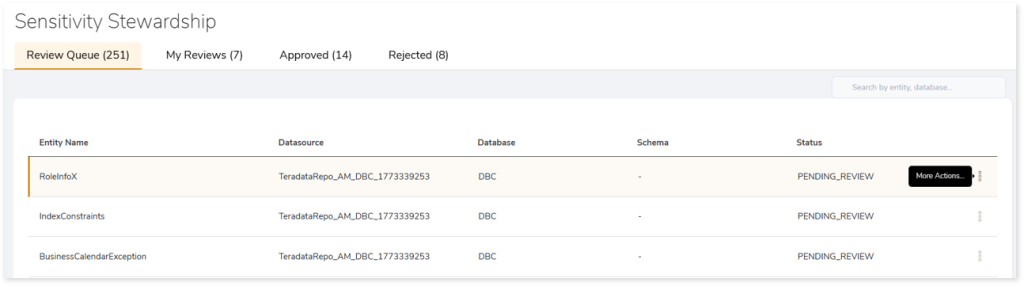
  3. The Sensitivity Stewardship opens with four tabs that help you manage and review PII‑tagged entities.
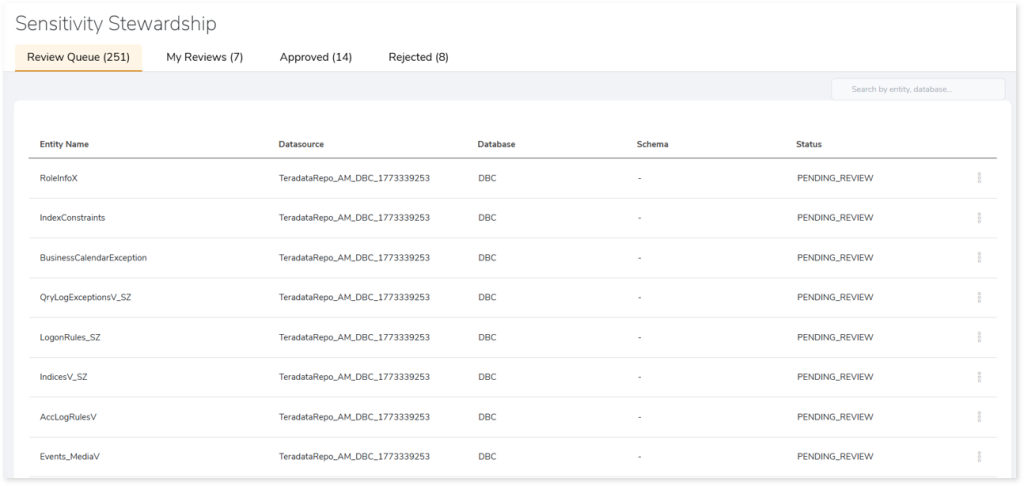

Review Queue

Displays all entities that are pending your review, where you can confirm whether the detected PII information is correct and decide if it should be approved or rejected. You can also view detailed information before making your decision.

To approve a PII‑tagged entity:

  1. In the Review Queue, locate the required entity.
  2. Click More Actions () in the entity row.
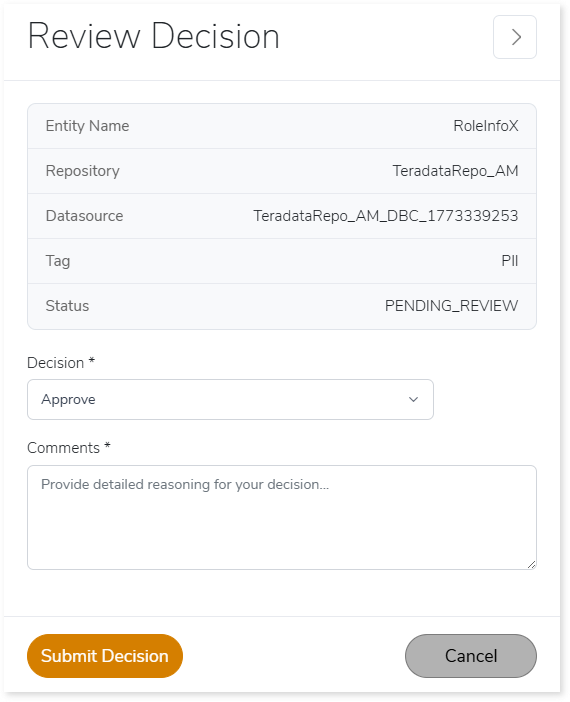
  1. Select Approve. The Review Decision window opens.

  1. In Decision, choose Approve.
  2. In Comments, provide a comment describing the reason for approval.
  3. Click Submit Decision.

To reject a PII-tagged entity:

  1. In the Review Queue, locate the required entity.
  2. Click More Actions () in the entity row.
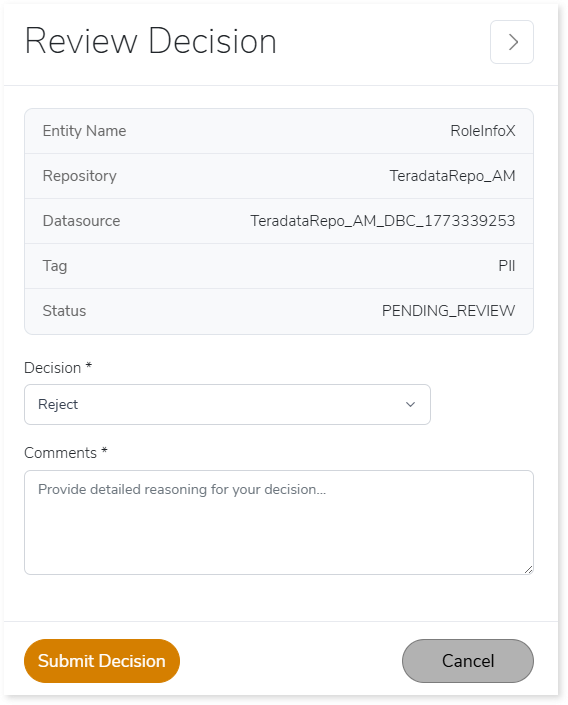
  1. Select Reject. The Review Decision window opens.
  1. In Decision, choose Reject.
  2. In Comments, provide a comment explaining the reason for rejection.
  3. Click Submit Decision.

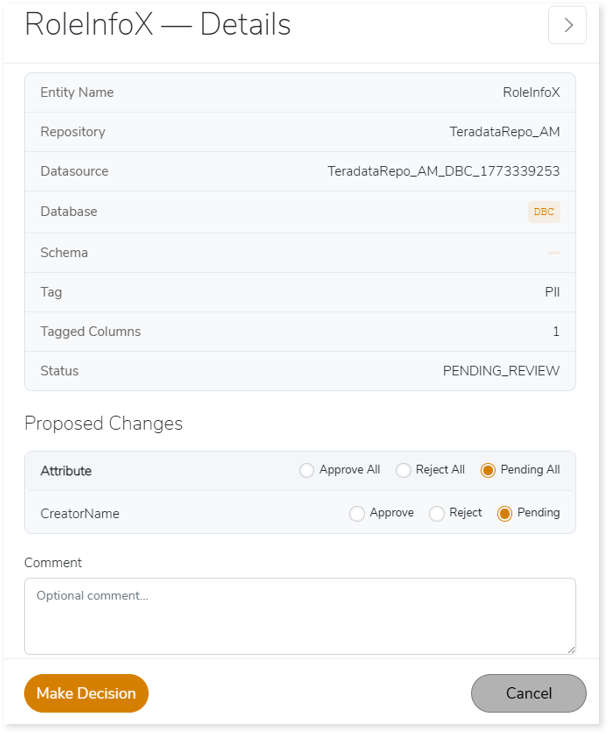
To view entity details before making a decision:

  1. In the Review Queue, locate the required entity.
  2. Click More Actions () in the entity row.
  1. Select View Details.
  1. The Details page opens, showing entity information, PII tag, and Proposed Changes.
  2. Review the attributes and the proposed sensitivity changes.
  3. Select Approve, Reject, or Pending for each attribute.
  4. In Comment, add a comment if needed.
  5. Click Make Decision to finalize your action.

My Reviews

Shows the list of entities currently assigned to you for review. These items are in progress and require you to validate the detected PII information before making a final decision.
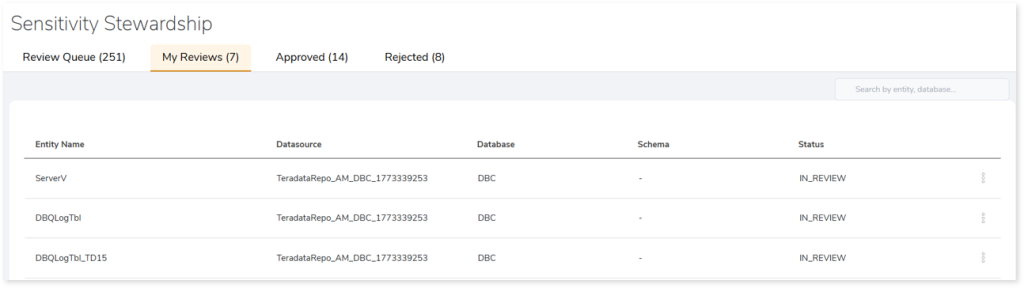
You can approve, reject, or view details for each entity using the same actions described in the Review Queue section.


Approved

Lists all entities where the PII classifications have been approved. These classifications are now finalized and operationalized.
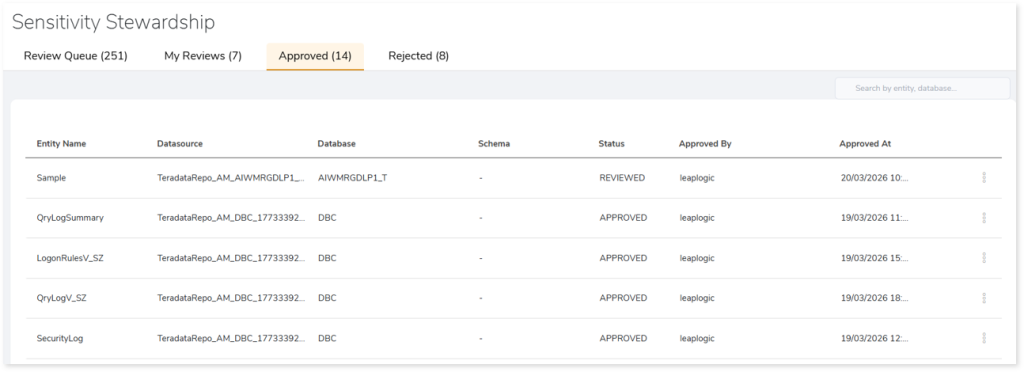
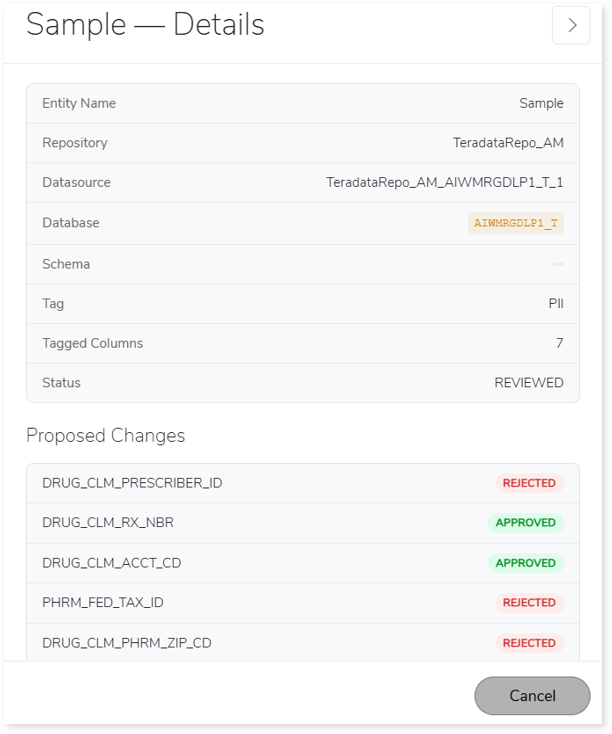
To view the details, click More Actions > View Details for the selected entity.

The details page displays the entity information, final decisions applied to each attribute, and the full list of approved or rejected sensitive fields.


Rejected

Displays all entities whose PII assignments were rejected during review, allowing you to monitor incorrect or low‑confidence classifications.
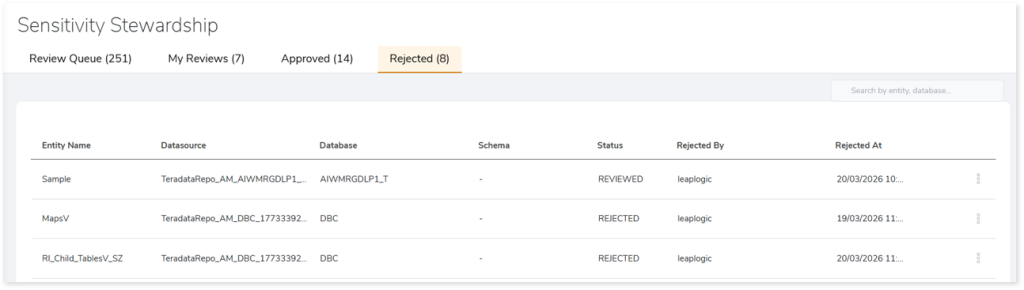
To view the details, click More Actions > View Details for the selected entity.

The details page displays the entity information, final decisions applied to each attribute, and the full list of approved or rejected sensitive fields.


To learn more, contact our support team or write to: info@leaplogic.io

Copyright © 2026 Impetus Technologies Inc. All Rights Reserved

  • Terms of Use
  • Privacy Policy
  • License Agreement
To the top ↑ Up ↑