Deployment
This section provides step-by-step instructions to deploy LeapLogic AI.
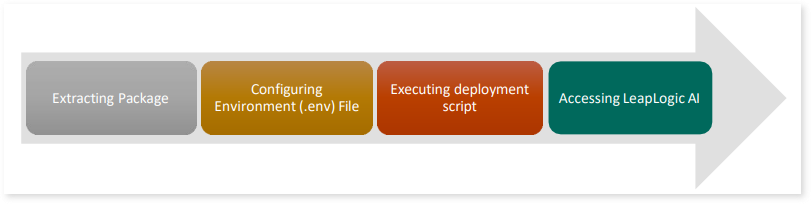
In This Topic:
Follow the steps below to extract the LeapLogic AI build on a Linux machine:
- Download the LeapLogic AI tar bundle on your Linux machine.
LeapLogic AI build is shipped as a tar package. Follow the steps below to extract it:
- Copy the LeapLogic AI package – leaplogic-ai-{version}.tar.gz to a directory on the server where you have access and sufficient disk space.
- Extract the package from the archived file using the command below:
tar -xzf leaplogic-ai-{version}.tar.gz
- A directory named leaplogic-ai will be created.
- Change the current directory to the above extracted directory using the command below:
- This directory is referenced as LLM_HOME. Ensure that the ownership of the LLM_HOME directory matches the account used to deploy the LeapLogic AI build.
Configuring Environment (.env) File
Update the environment variables in the leaplogic-ai-env.sh file according to your environment and database configuration:
- Go to the path below and edit the .env file using the following commands
cd leaplogic-ai/bin
vi llm-fusion-env.sh
Below are some of the configurable properties in the leaplogic-ai-env.sh file.
|
Property |
Purpose |
|
DATABASE_TYPE |
Specify the database type used for LeapLogic AI deployment. |
|
JDBC_TARGET_DB |
Specify the database type: postgresql/mysql |
|
DATABASE_HOST |
Provide the database host name. If using RDS, specify the RDS endpoint. |
|
DATABASE_USERNAME |
Specify the database username. |
|
DATABASE_PASSWORD |
Provide the encrypted database password (encrypted through LeapLogic AI encrypt utility). |
|
DATABASE_PORT |
Provide the database port. |
|
JDBC_DRIVER_CLASS_NAME |
Specify the JDBC driver class name based on the database type being used. |
|
HIBERNATE_DIALECT |
Specify the Dialect name based on the database type being used. |
|
POSTGRES_HOME |
If you are using LeapLogic database, then provide the LeapLogic Postgres bundle path. |
|
GOOGLE_APPLICATION_CREDENTIALS |
If GCP Vertex connection is required, then
provide GCP service account key JSON file path. |
|
ENABLE_QDRANT |
Enable or disable the Qdrant service. By default, it is set to ‘true’. |
|
VECTOR_HOST |
Specify the host for Vector DB. By default, it is
server hostname. |
- After completing the required environment configuration, save and exit the file using the following command:
Executing Deployment Script
Execute the leaplogic-ai-deploy.sh script to configure and start LeapLogic AI service using the following command:
${LEAPLOGIC_HOME}/bin/llm-fusion-deploy.sh
Accessing LeapLogic AI
Once the above script is executed successfully, you can access LeapLogic AI using the following URL
http://<server-hostname>:13033/swagger-ui/index.html#/
 Leaplogic