SAP BO Assessment Report
This topic contains information about the SAP BO assessment report. The assessment assesses workloads and produces in-depth insights that help to plan the migration in a phased manner. The input format for SAP BO assessment is XML, DAT, or compressed zip format.
In This Topic:
Highlights
The Highlights section provides a high-level summary of the assessment based on analytics performed on the selected workloads. It includes details of input source files, the associated workload inventory, and information about Universes, WebI, and Crystal reports.
Summary
This section provides an overview of input source files and the associated workload inventory including universes, WebI reports, Crystal reports, and more.
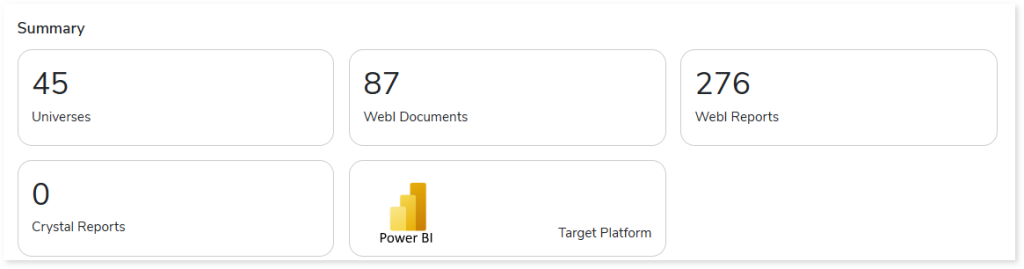
- Universes: Displays the number of universes in the source input files. A universe is a set of metadata objects for analyzing and reporting data.
- WebI Documents: Displays the number of WebI documents in the source input files.
- WebI Reports: Displays the number of WebI reports in the WebI documents.
- Crystal Reports: Displays the number of Crystal reports in the source input files.
- Target Platform: Displays the name of the target platform.
Complexity
The Complexity section provides a complexity assessment for Universes, Web Intelligence (WebI) documents, and Crystal reports. This assessment supports decision-making for migration planning and budget estimation.
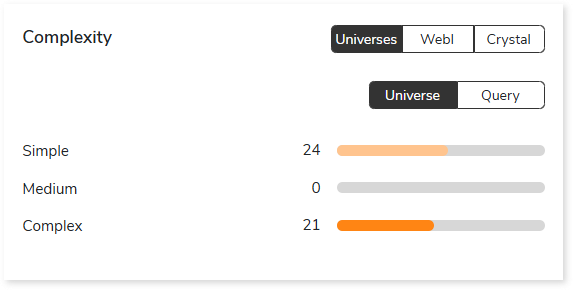
- Universes: Displays complexity assessment for Universes and queries.
- WebI: Displays complexity assessment for WebI documents and queries.
- Crystal: Displays complexity assessment for visuals, data models, and queries in Crystal reports.
Universes
Summary
This section provides an overview of universes with key components including attributes, dimensions, measures, and more.

Objects
This section provides details about the total number of objects along with their distribution across various object types.
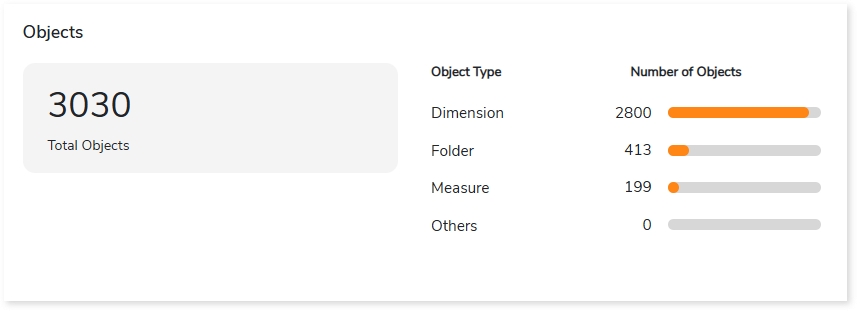
- Total Objects: Displays the total number of objects.
- Object Type: Lists the object types along with the number of associated objects arranged in descending order.
Object Data Type
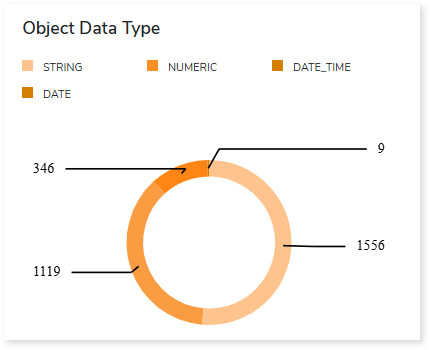
This section provides an overview of object data types used in the universe, including string, numeric, date, etc.
Filters
This section provides an overview of total, business, and native rational filters within the entire universe.
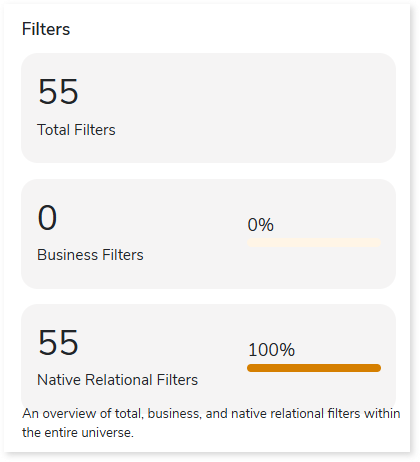
- Total Filter: Displays the total number of filters present in Universes.
- Business Filters: Displays the total number of business filters present in Universes. A business filter is a filter defined at the Business Layer that restricts data based on business objects.
- Native Relational Filters: Displays the total number of native relational filters present in Universes. Native Relational Filters are SQL based pre filters applied in relational business layers to restrict data at the source.
Entities
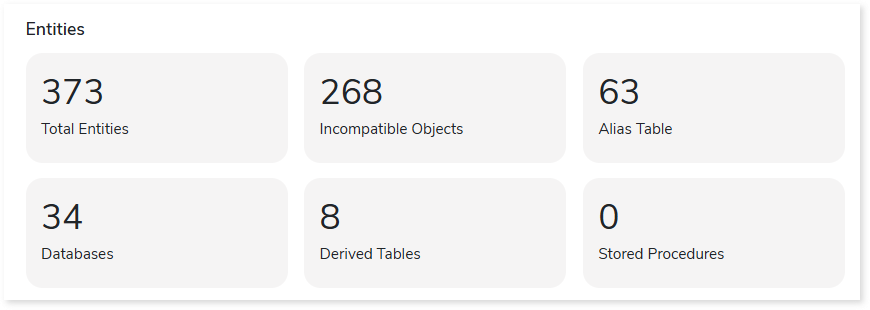
This section provides details about entities present in the Universes. It includes information about the total number of entities (tables, stored procedures, objects), incompatible objects, tables aliases, databases, derived tables, and more.
Columns
This section provides an overview of the total and calculated columns along with the distribution of columns across different data types.
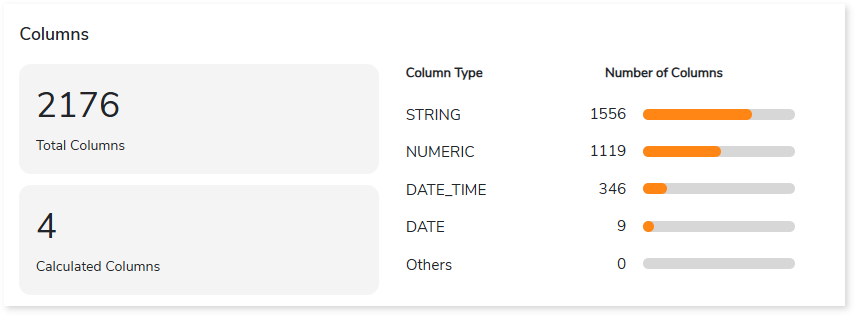
- Total Columns: Displays the number of total columns.
- Calculated Columns: Displays the number of calculated columns. Calculated columns are columns created by applying a formula or expression to the existing columns.
- Data Type: Lists the data types and the number of associated columns arranged in descending order.
WebI
Summary
This section provides an overview of WebI reports with key components including reports, data providers, variables, visualizations, and more.

Variable Types
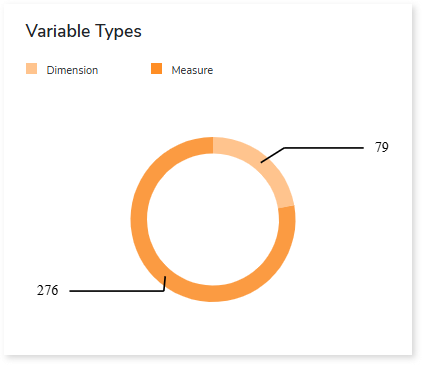
This section provides an overview of variable types in the WebI reports including dimensions and measures.
Filters
This section provides an overview of total, element, and report filters within the entire WebI reports.
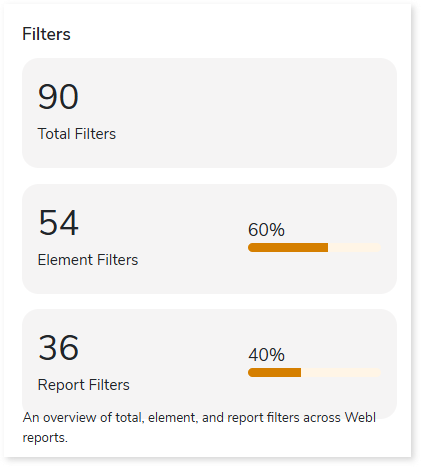
- Total Filters: Displays the total number of filters applied in the WebI report.
- Element Filters: Displays the total number of element filters in the WebI reports. Element filters restrict data for a specific table or visualization without affecting other report elements or the underlying query.
- Report Filters: Displays the total number of report filters in the WebI reports. Report Filters are filters applied at the report level to control the data displayed in the report.
Visualizations
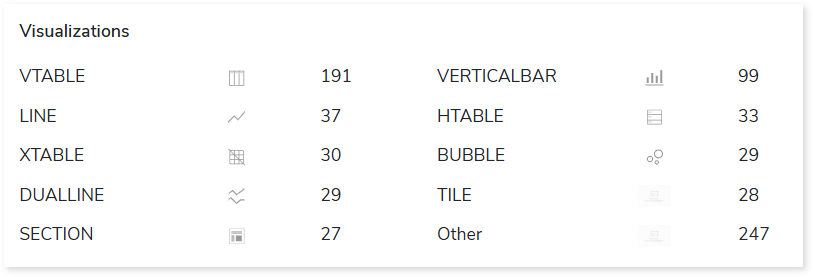
This section provides details about the different visualization types (such as tables, line graphs, charts, etc) used in WebI reports, along with their counts. These visual elements help present data in an easy-to-understand format.
Crystal
Summary
This section provides an overview of Crystal reports with key components including crystal reports, enterprise crystal reports, parameters, tables, and more.

Report Objects
This section provides details about the total number of objects along with their distribution across various object types.
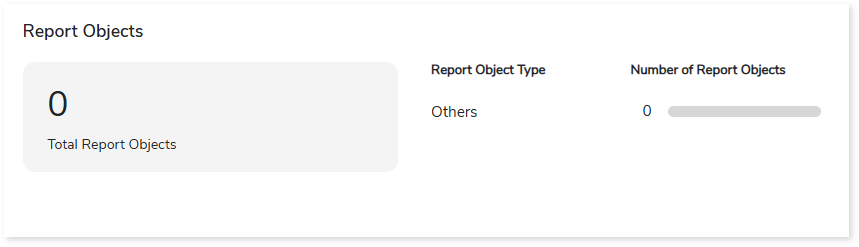
- Total Report Objects: Displays the total number of report objects in Crystal reports.
- Object Type: Lists the report object types along with the number of associated objects arranged in descending order.
Columns
This section provides an overview of the total and calculated columns along with the distribution of columns across different data types.
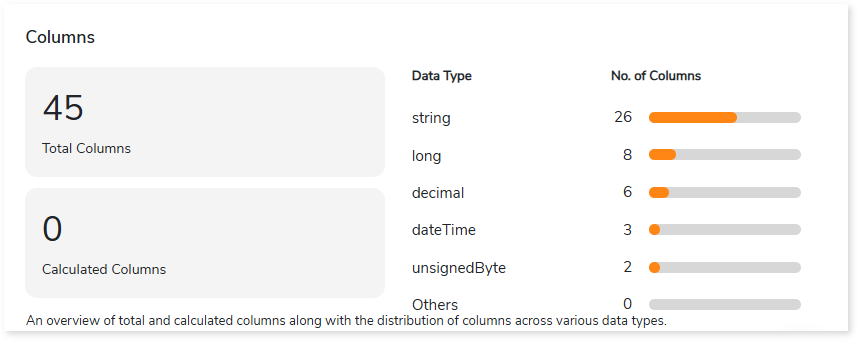
- Total Columns: Displays the number of total columns in the Crystal reports.
- Calculated Columns: Displays the number of calculated columns. Calculated columns are columns created by applying a formula or expression to existing columns.
- Data Type: Lists the data types and the number of associated columns arranged in descending order.
Analysis
The Analysis section provides a detailed examination of SAP BO input files, including Universes, Web Intelligence (WebI) reports, Crystal Reports, and Queries. It offers insights into the source inventory and delivers comprehensive analysis reports covering reports, objects, entities, and more.
Universes
This section provides detailed insights into Universes, including associated reports, objects, parameters, entities, and more.
Universe
This section provides detailed information about universes including their name, ID, type, associated filters, joins, and other related details.
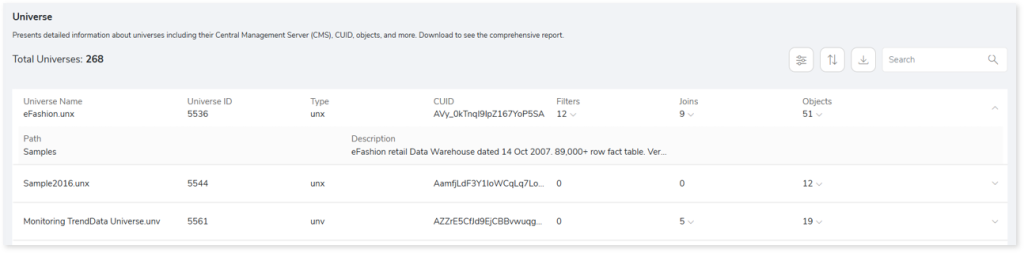
- Universe Name: Displays the name of the Universe.
- Universe ID: Displays the unique identifier (ID) of each Universe.
- Type: Displays the type of each Universe (e.g., unx, unv).
- CUID: Displays the Cluster Unique Identifier (CUID) of each universe, which uniquely identifies the universe in SAP BusinessObjects.
- Filters: Displays the total number of filters in each Universe.
- Joins: Displays the total number of joins in each Universe.
- Objects: Displays the total number of objects in each Universe.
- Path: Displays the file path of each Universe.
- Description: Displays the description of each Universe.
Reports
This section provides detailed information about reports including their type and associated universe.
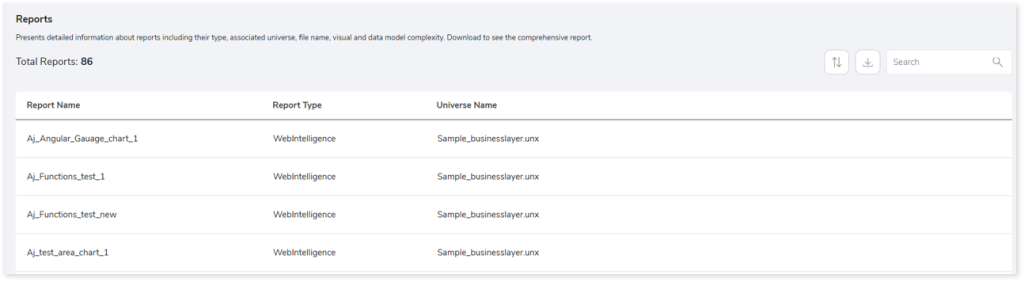
- Report Name: Displays the name of each report.
- Report Type: Displays the type of each report (e.g., Web Intelligence) associated with the Universe.
- Universe Name: Displays the name of the Universe linked to each report.
Objects
This section provides detailed information about Universe objects and incompatible objects, including their type, associated universe, object ID, path, and other related details.
Objects
Displays all the objects in the universe along with details such as associated universe, object ID, type, path, and more.
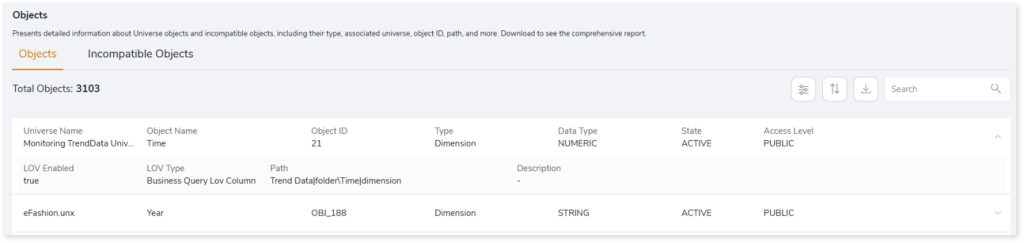
- Universe Name: Displays the name of the Universe associated with each object.
- Object Name: Displays the name of each object.
- Object ID: Displays the unique identifier (ID) of each object.
- Type: Displays the type of each object (e.g., Dimension, Attribute, Measure).
- Data Type: Displays the data type of each object (e.g., Numeric, String).
- State: Displays the status of each object (e.g., ACTIVE or INACTIVE).
- Access Level: Displays the access level of each object (e.g., Public, Private).
- LOV Enabled: Indicates whether a List of Values (LOV) is enabled for the object.
- LOV Type: Displays the type of List of Values (LOV) associated with the object.
- Path: Displays the path of each object within the Universe.
- Description: Displays the description of each object.
Incompatible Objects
Displays all the incompatible objects in the universe along with details such as associated universe, object ID, table, and path.
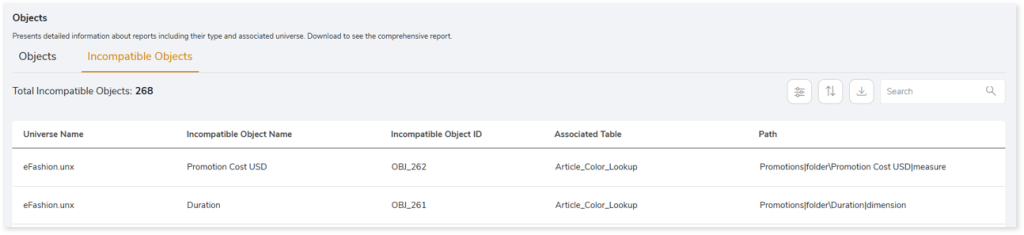
- Object Name: Displays the name of each incompatible object.
- Object ID: Displays the unique identifier (ID) of each incompatible object.
- Universe Name: Displays the name of the Universe associated with each incompatible object.
- Associated Table: Displays the name of the table associated with each incompatible object.
- Path: Displays the path of each incompatible object within the Universe.
Parameters
This section provides detailed information about all parameters in the universes, including their associated universe, parameter ID, data type, prompt text, and other related details.
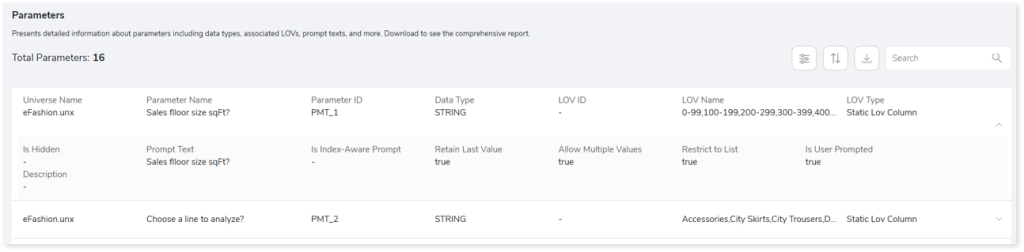
- Universe Name: Displays the name of the Universe associated with each parameter.
- Parameter Name: Displays the name of each parameter.
- Parameter ID: Displays the unique identifier (ID) of each parameter.
- Data Type: Displays the data type of each parameter (e.g., STRING, NUMBER).
- LOV ID: Displays the unique identifier (ID) of the List of Values (LOV) associated with each parameter.
- LOV Name: Displays the name of the List of Values (LOV) associated with each parameter.
- LOV Type: Displays the type of List of Values (LOV) associated with each parameter (e.g., Static LOV Column).
- Is Hidden: Indicates whether the parameter is hidden.
- Prompt Text: Displays the message or text shown when a prompt requires a value.
- Is Index-Aware Prompt: Indicates whether the prompt is configured as index‑aware. An index‑aware prompt uses indexed key columns for faster value retrieval.
- Retain Last Value: Indicates whether the last entered value is retained in the parameter (true or false).
- Allow Multiple Values: Indicates whether multiple values can be selected for the parameter (true or false).
- Restrict to List: Indicates whether the parameter values are restricted to the List (true or false).
- Is User Prompted: Indicates whether the parameter was provided by the user (true) or taken from the default value (false).
Entities
This section provides detailed information about tables, joins, and contexts in the universes.
Tables
Displays all the tables in the universes, including their associated ID, universe, and more.
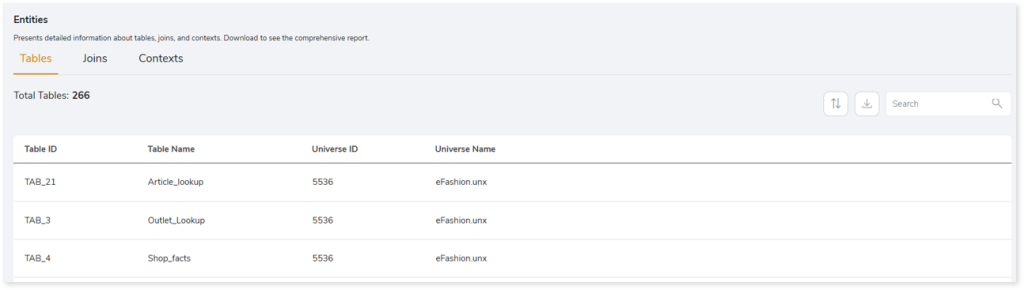
- Total Tables: Displays the total number of tables in the universe.
- Table ID: Displays the unique identifier (ID) of each table in the universe.
- Table Name: Displays the name of each table in the universe.
- Universe ID: Displays the unique identifier (ID) of the universe associated with each table.
- Universe Name: Displays the name of the universe associated with each table.
Joins
Displays all the joins in the universes, including information about left and right tables, associated universe, expression, and other related details.
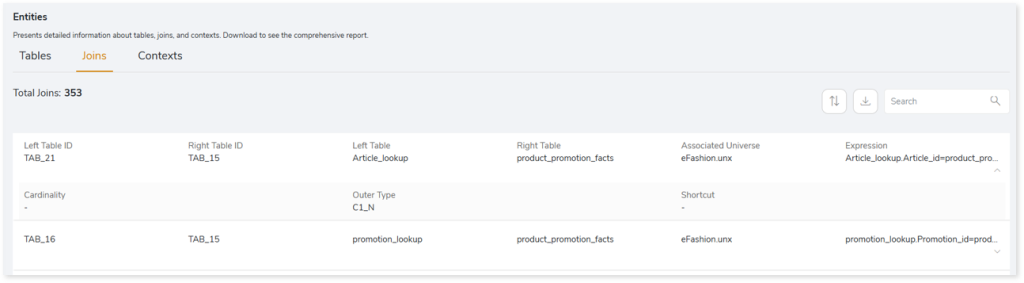
- Left Table ID: Displays the unique identifier of the left table in the join statement.
- Right Table ID: Displays the unique identifier of the right table in the join statement.
- Left Table: Displays the name of the left table in the join statement.
- Right Table: Displays the name of the right table in the join statement.
- Associated Universe: Displays the name of the universe associated with each join.
- Expression: Displays the join expression that defines the relationship between the tables.
- Cardinality: Indicates the cardinality of the join.
- Outer Type: Specifies the type of outer join.
- Shortcut: Displays the join that is defined as a shortcut join. A shortcut join creates a direct, alternate path between two tables by skipping intermediate tables.
Contexts
Displays all the contexts in the universes, including their associated ID, universe, and related details.
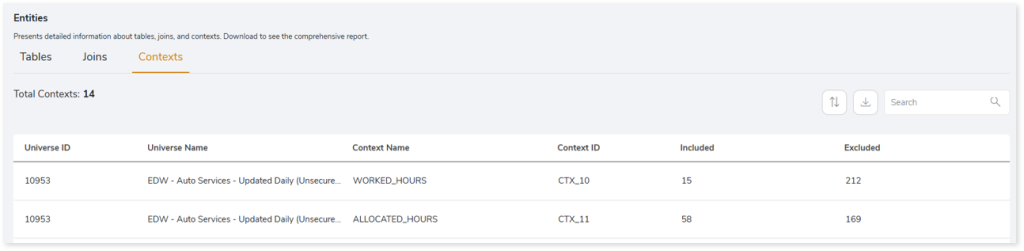
- Universe ID: Displays the unique identifier (ID) of the universe associated with each context.
- Universe Name: Displays the name of the universe associated with each context.
- Context Name: Displays the name of each context.
- Context ID: Displays the unique identifier (ID) of each context.
- Included: Shows the number of joins included in the context.
- Excluded: Shows the number of joins excluded from the context.
WebI
This section provides detailed insights into WebI, including associated documents, reports, data providers, and visualizations.
WebI Documents
This section provides detailed information about WebI documents including their ID, document type, path, and other related details.
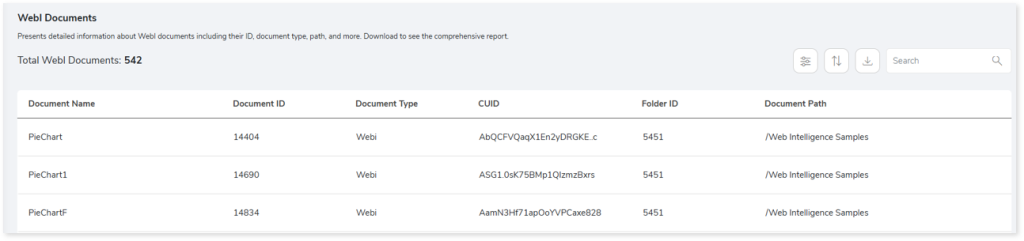
- Document Name: Displays the name of the Web Intelligence (WebI) document.
- Document ID: Displays the unique identifier (ID) of the WebI document.
- Document Type: Displays the type of the WebI document (e.g., WebI).
- CUID: Displays the unique cluster identifier (CUID) of the WebI document.
- Folder ID: Displays the unique identifier (ID) of the folder containing the WebI document.
- Document Path: Displays the path where the WebI document is present.
WebI Reports
This section provides detailed information about WebI reports including their ID, associated document, filters, and other related details.
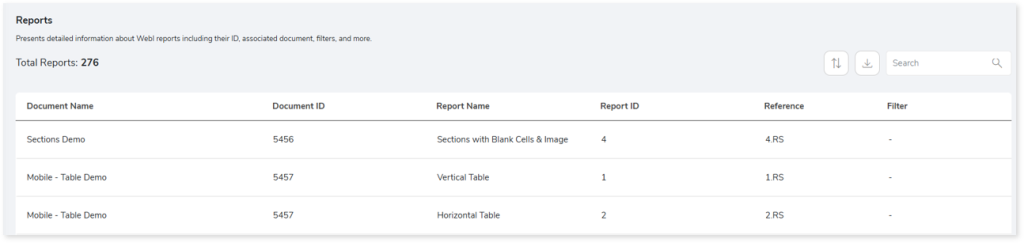
- Document Name: Displays the name of the Web Intelligence (WebI) document associated with the report.
- Document ID: Displays the unique identifier (ID) of the WebI document associated with the report.
- Report Name: Displays the name of the Web Intelligence (WebI) report.
- Report ID: Displays the unique identifier (ID) of the WebI report.
- Reference: Displays the reference code associated with the WebI report.
- Filter: Displays the filters that are applied on the WebI report.
Data Providers
This section provides detailed information about WebI data providers including their ID, associated document, expressions, and other related details.
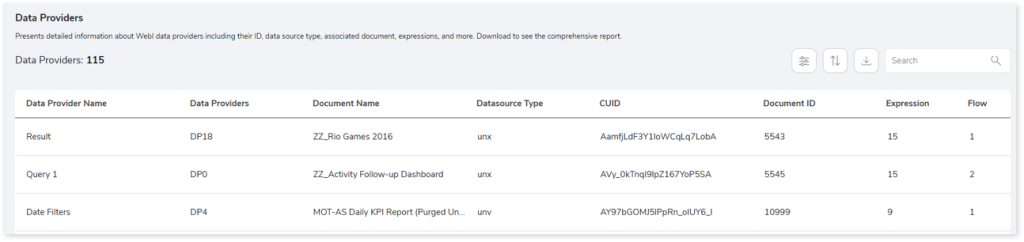
- Data Provider Name: Displays the name of the data provider.
- Data Provider ID: Displays the identifier or code of the WebI data provider.
- Document Name: Displays the name of the Web Intelligence (WebI) document associated with the data provider.
- Datasource Type: Displays the type of data source associated with the data provider (e.g., UNX, UNV).
- CUID: Displays the unique cluster identifier (CUID) of the data provider.
- Document ID: Displays the unique identifier (ID) of the WebI document associated with the data provider.
- Expression: Displays the number of expressions used in the data provider.
- Flow: Displays the number of queries that reference or call the flow that is automatically created by SAP BO when the data provider is generated.
Visualizations
This section provides detailed information about WebI visualizations including their type, associated document, report, axis type, value, and other related details.
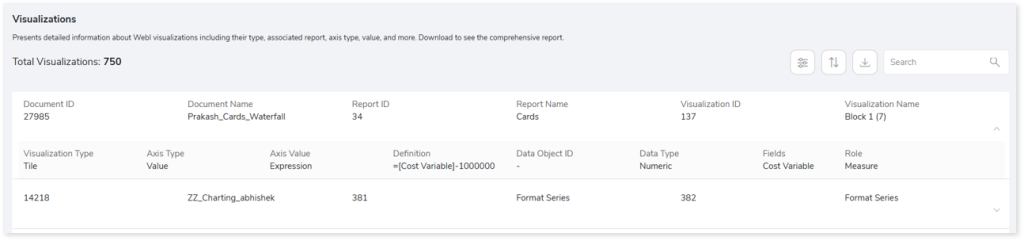
- Document ID: Displays the unique identifier (ID) of the Web Intelligence (WebI) document associated with the visualization.
- Document Name: Displays the name of the Web Intelligence (WebI) document associated with the visualization.
- Report ID: Displays the unique identifier (ID) of the WebI report associated with the visualization.
- Report Name: Displays the name of the Web Intelligence (WebI) report associated with the visualization.
- Visualization ID: Displays the unique identifier (ID) of the visualization.
- Visualization Name: Displays the name of the visualization.
- Visualization Type: Displays the type of visualization (e.g., Table, Chart, Tile).
- Axis Type: Displays the type of axis used in the visualization (e.g., Value, Category).
- Axis Value: Displays the value associated with the axis.
- Definition: Displays the formula or expression defining the visualization.
- Data Object ID: Displays the unique identifier (ID) of the data object used in the visualization.
- Data Type: Displays the type of data (e.g., Numeric, String) used in the visualization.
- Fields: Displays the fields included in the visualization.
- Role: Displays the role of the field in visualization (e.g., Measure, Dimension).
Crystal
This section provides detailed insights into Crystal reports, including associated data sources, report objects, reports, and more.
Data Sources
This section provides a comprehensive report of data sources including data source types, universes, and tables.
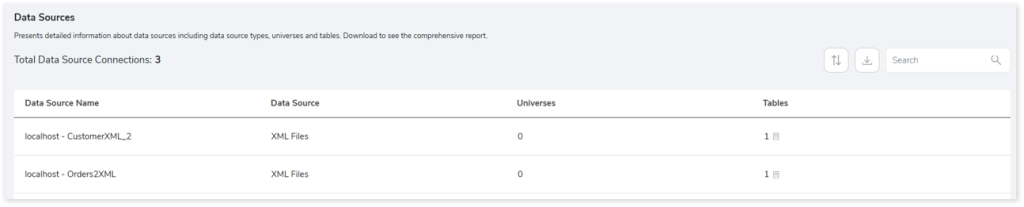
- Data Source Name: Displays the name of the data source.
- Data Source: Displays the type of data source connection.
- Universes: Displays the number of universes associated with the data source.
- Tables: Displays the number of tables associated with the data source.
Objects
This section provides information about objects including object types, areas, area types, sections, and more.
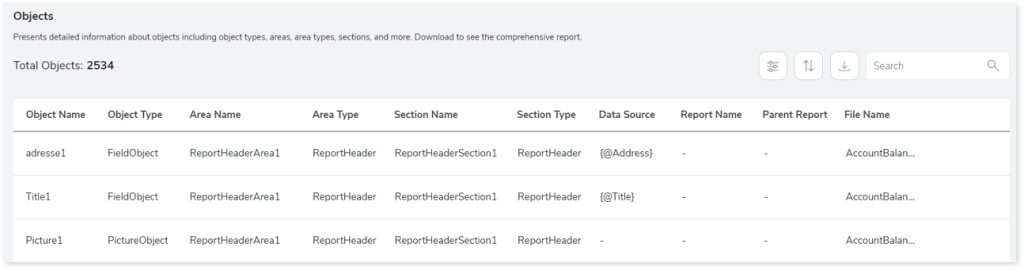
- Object Name: Displays the name of the object.
- Object Type: Displays the type of each object.
- Area Name: Displays the area where the object is located. Area refers to a specific section such as the header, footer, body, etc., in the SAP BO reports.
- Area Type: Displays the type of area such as header, footer, body etc. in the SAP BO reports.
- Section Name: Displays the section associated with each object. Section refers to a block in the SAP BO report area which helps to group, organize and present data logically.
- Section Type: Displays the type of section for each object.
- Data Source: Displays the associated data source of the object.
- Report Name: Displays the reports associated with each object.
- Parent Report: Displays the top-level or parent report of the report.
- File Name: Displays the file name where the object is present.
Parameters
This section provides information about the parameters including its type, file, prompt text, and more.
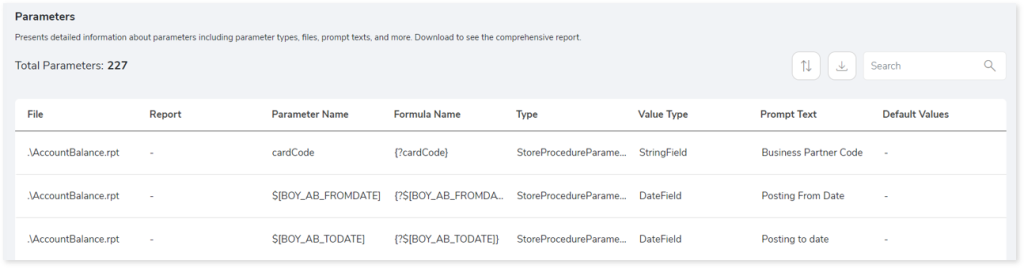
- File: Displays the file name where the parameter is present.
- Report: Displays the reports associated with each parameter.
- Parameter Name: Displays the name of the parameter.
- Formula Name: Displays the expression or formula that uses the parameter.
- Type: Displays the type of usage for each parameter based on where it is applied or used such as report, query, or stored procedure (SP), etc.
- Value Type: Displays the data type of each parameter.
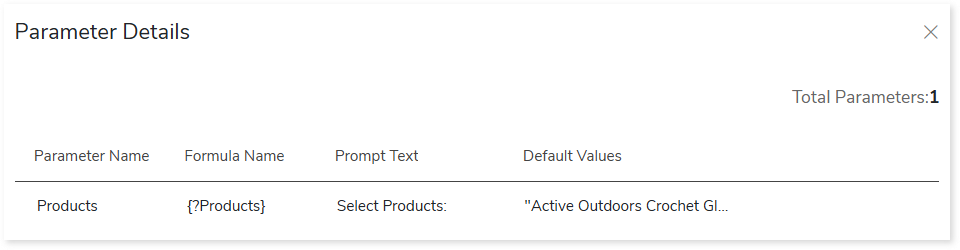
- Prompt Text: Displays the prompt text associated with each parameter.
- Default Values: Displays the default value assigned to each parameter when input is not provided.
Entities
This section provides a summary of all tables as well as join types.
Tables
This section displays a detailed analysis of all tables.
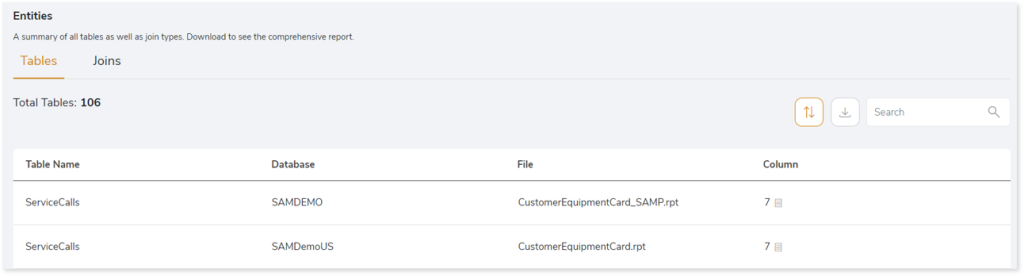
- Table Name: Displays the name of the table.
- Database: Displays the database from which the table is derived.
- File: Displays the file name where the table is present.
- Column: Displays the number of columns associated with each table.
Joins
This section provides information about the join statements in the source file.
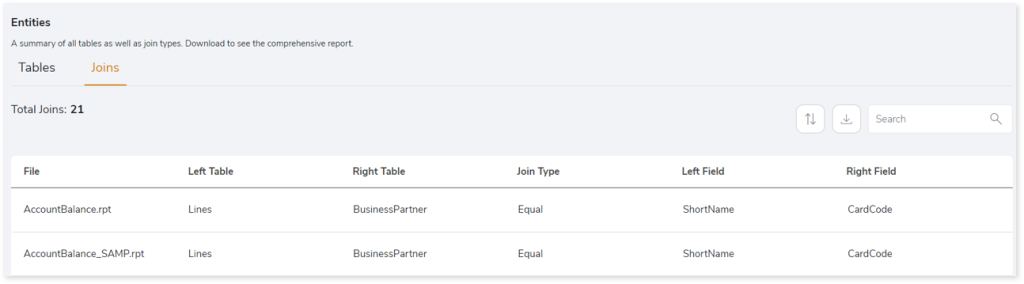
- File: Displays the file name where the join statement is present.
- Left Table: Displays the left table name in the join statement.
- Right Table: Displays the right table name in the join statement.
- Join Type: Displays the join type.
- Left Field: Displays columns from the left table.
- Right Field: Displays columns from the right table.
Crystal Reports
This section provides information about crystal reports including file name, file type, number of parameters, and more.
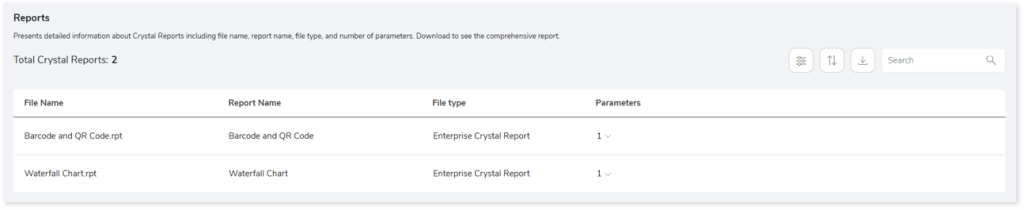
- File Name: Displays the name of the file.
- Report Name: Displays the name of the crystal report,
- File Type: Displays the type of file.
- Parameters: Displays the number of parameters in each report. Click
 to view detailed information about the parameters.
Queries
This section provides a comprehensive summary of queries including all, parsed, and unparsed queries.
All Queries
This section displays a list of all the queries.
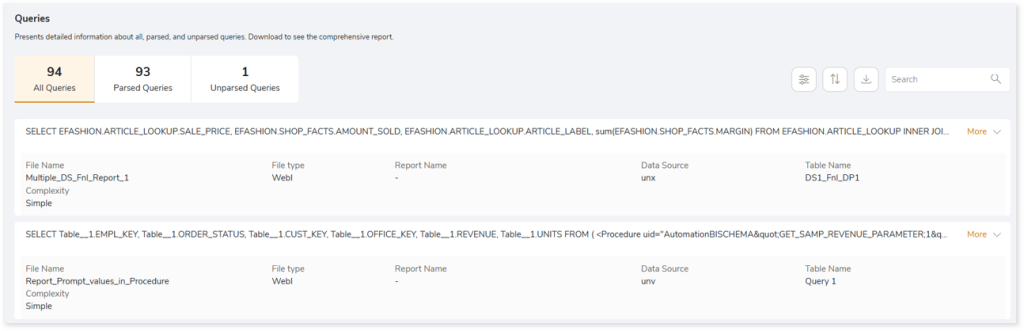
- File Name: Displays the name of the file that contains the query.
- File Type: Displays the type of the file.
- Report Name: Displays the name of the associated report.
- Data Source: Displays the name of the associated data source.
- Table Name: Displays the name of the associated table.
- Complexity: Displays the query complexity
Parsed Queries
This section displays a list of all the parsed queries.
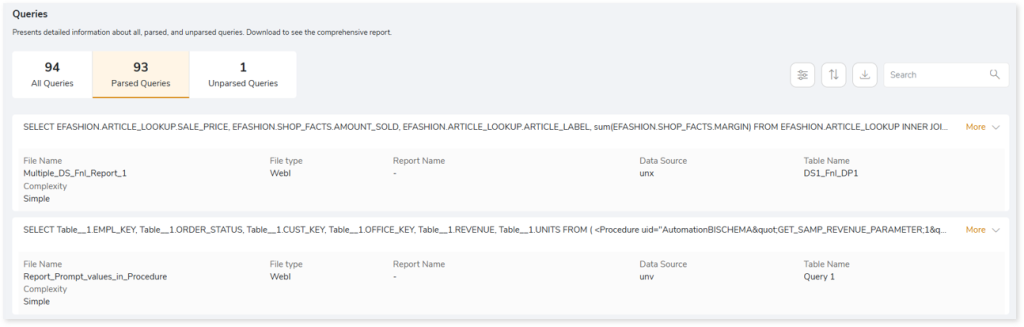
- File Name: Displays the name of the file that contains the query.
- File Type: Displays the type of the file.
- Report Name: Displays the name of the associated report.
- Data Source: Displays the name of the associated data source.
- Table Name: Displays the name of the associated table.
- Complexity: Displays the query complexity
Unparsed Queries
This section displays a list of all the unparsed queries.
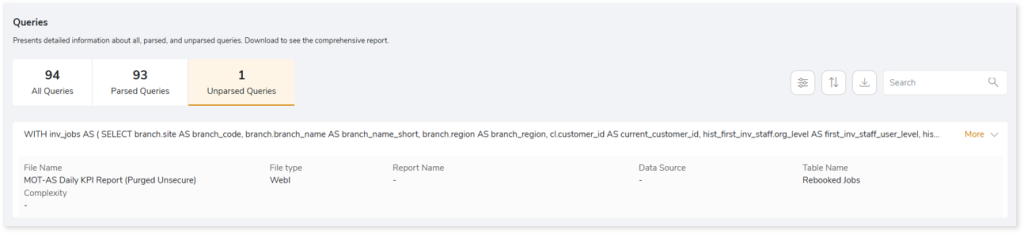
- File Name: Displays the name of the file that contains the query.
- File Type: Displays the type of the file.
- Report Name: Displays the name of the associated report.
- Data Source: Displays the name of the associated data source.
- Table Name: Displays the name of the associated table.
- Complexity: Displays the query complexity
Lineage
End-to-end process lineage identify the complete dependency structure through interactive and drill-down options to the last level.
Typically, even within one line of business, multiple data sources, entry points, ETL tools, and orchestration mechanisms exist. Decoding this complex data web and translating it into a simple visual flow can be extremely challenging during large-scale modernization programs. The visual lineage graph adds tremendous value and helps define the roadmap to the modern data architecture. It deep dives into all the existing flows and provides integrated insights. These insights help data teams make strategic decisions with greater accuracy and completeness. Enterprises can proactively leverage integrated analysis to mitigate the risks associated with migration and avoid business disruption.
Now, let’s see how you can efficiently manage lineage.

To view the required lineage:
- Select either the Process or Data Model tab.
- Enter the keywords in the Search Keywords field.
- Click the Search icon to generate the lineage.
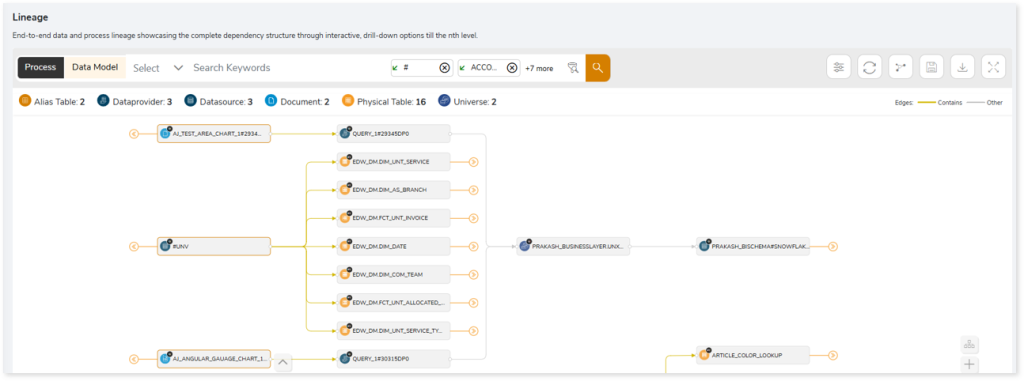
Process lineage illustrates the dependencies between two or more processes such as entities, documents, alias tables, universes, data providers, and more, whereas data model shows the end-to-end relationships and dependencies between elements.

In addition, the filter search icon allows you to include or exclude particular nodes to obtain the required dependency structure. You can also choose the direction of the lineage. By default, the Dependency Direction is Left to Right Hierarchy. You can also choose Right to Left Hierarchy or Bidirectional dependency directions as required. Moreover, you can also increase the Hierarchy Levels to nth level.
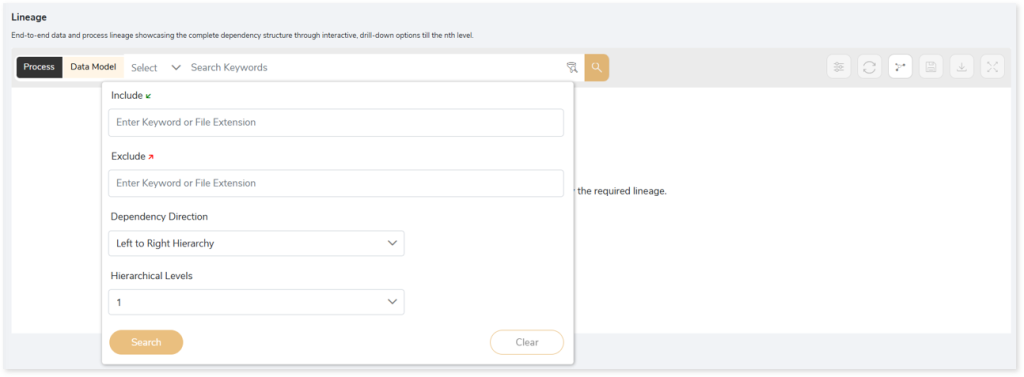
Lineage facilitates you visualize how your selected nodes are connected and depend on each other. The nodes and their connecting edges (relationships) help you to understand the overall structure and dependencies.
|
Nodes |
Edges |
 Alias Table Alias Table |
 Call Call |
 Data Provider Data Provider |
 Read Read |
 Data Source Data Source |
 Write Write |
 Document Document |
 Execute Execute |
 Physical Table Physical Table |
 Others Others |
 Universe Universe |
 Contains Contains |
 Logical Table Logical Table |
|
 Report Report |
|
Manage Lineage
This feature enables you to view and manage your lineage. You can add, modify, or delete nodes and their relationships to generate an accurate representation of the required dependency structure. There are two ways to update the lineage: either using Complete Lineage report or Lineage Template.
Using Complete Lineage report
Follow the below steps to modify the lineage:
- Click the Manage Graph icon.

- Click Download Complete Lineage to update, add, or delete the nodes and their relationships in the current lineage.
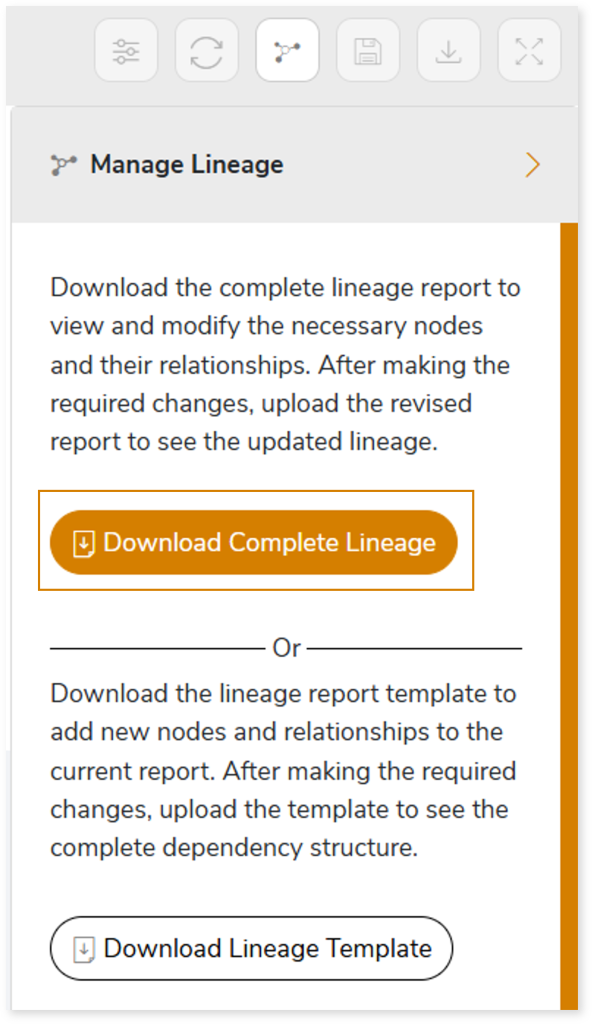
- Once the complete lineage report is downloaded, you can make necessary updates such as updating, deleting or adding the nodes and its relationships.
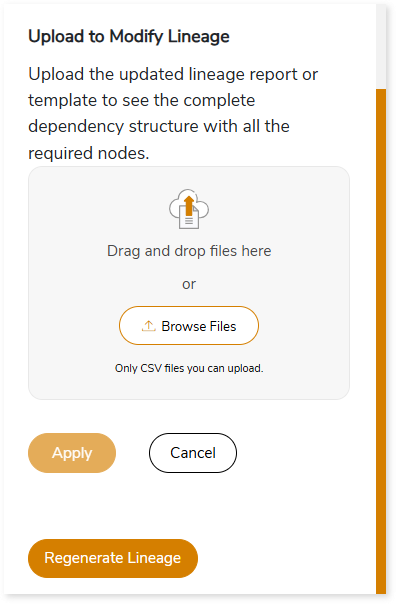
- After making the required changes, upload the updated lineage report in Upload to Modify Lineage.
- Click Apply to incorporate the changes into the dependency structure.
- Generate the required process or data model lineage.
- Click Regenerate Lineage to update the Lineage Analysis report with the latest data.
Using Lineage Template
Follow the below steps to add new nodes and their relationships to the current lineage report:
- Click the Manage Graph icon.

- Click Download Lineage Template.
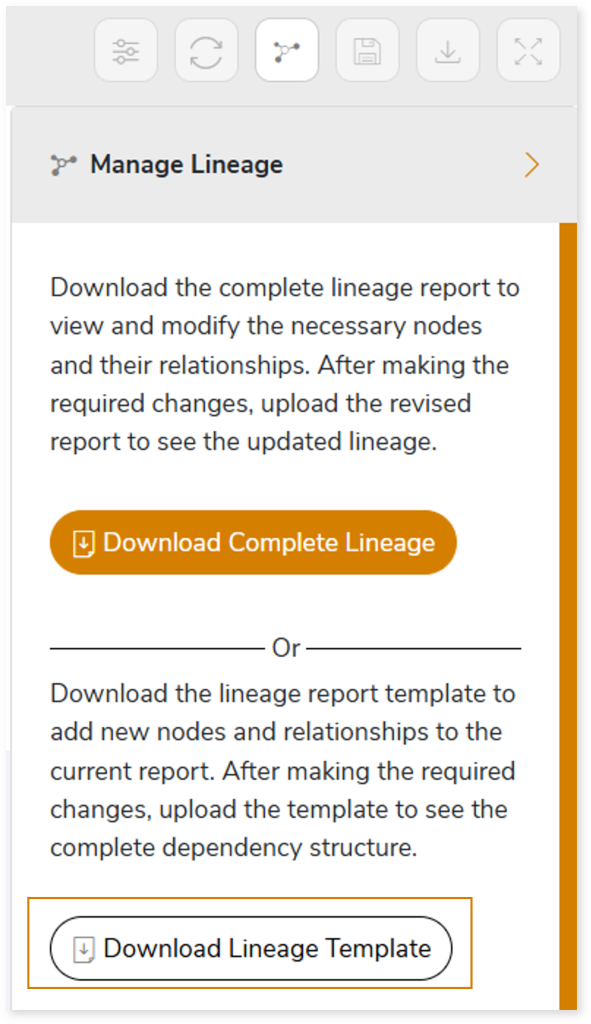
- Once the lineage template is downloaded, you can add new nodes and relationships in the template.
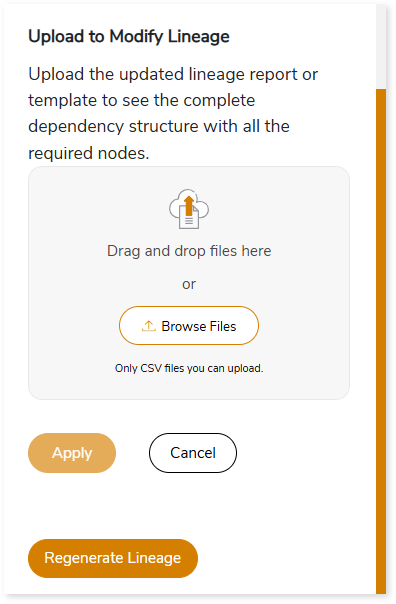
- After making the required changes, upload the template in Upload to Modify Lineage.
- Click Apply to incorporate the changes into the complete dependency structure.
- Generate the required process or data model lineage.
- Click Regenerate Lineage to update the Lineage Analysis report with the latest data.
You can also apply:
| Feature | Icon | Use |
| Filter |  | Used to filter the lineage. |
| Reload Graph |  | Assists in reloading graphs. |
| Manage Graph |  | To view and manage lineage by adding, modifying, or deleting nodes and their relationships to accurately reflect dependency structures. |
| Save |  | Used to save the lineage. |
| Download |  | Used to download the file. |
| Expand |  | Used to enlarge the screen. |
Downloadable Reports
Downloadable reports allow you to export detailed SAP BO assessment reports of your source data which enables you to gain in-depth insights with ease. To access these assessment reports, click Reports.

Types of Reports
In the Reports section, you can see various types of reports such as Insights and Recommendations, Source Inventory Analysis, and Lineage Analysis. Each report type offers detailed information allowing you to explore your assessment results.

Insights and Recommendations
This report provides an in-depth insight into the source input files. It contains the final output including the details of reports, tables, fields, and more.

SAP BO Report.xlsx: This report provides insights about the source inventory. It helps you plan the next frontier of a modern data platform methodically. It includes information about crystal reports, data models, universes, and more.
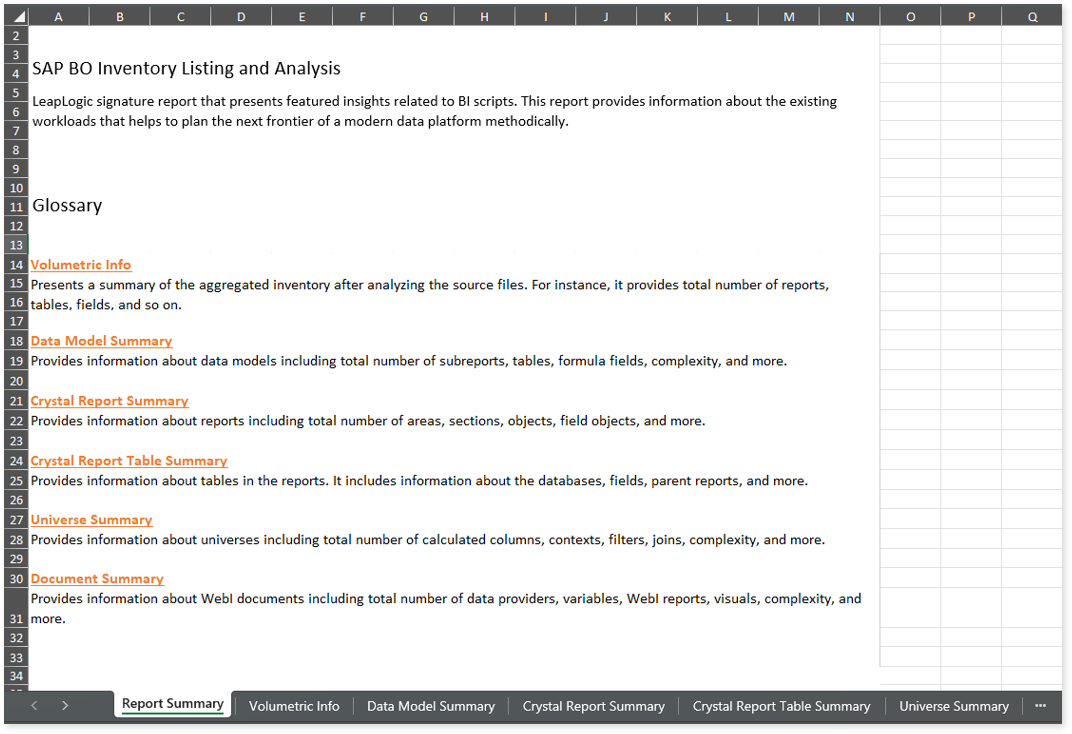
This report contains the following information:
- Report Summary: Provides information about all the generated artifacts.
- Volumetric Info: Presents a summary of the aggregated inventory after analyzing the source files. For instance, it provides total number of reports, tables, fields, and so on.
- Data Model Summary: Provides information about data models including total number of subreports, tables, formula fields, complexity, and more.
- Crystal Report Summary: Provides information about reports including total number of areas, sections, objects, field objects, and more.
- Crystal Report Table Summary: Provides information about tables in the reports. It includes information about the databases, fields, parent reports, and more.
- Universe Summary: Provides information about universes including total number of calculated columns, contexts, filters, joins, complexity, and more.
- Document Summary: Provides information about WebI documents including total number of data providers, variables, WebI reports, visuals, complexity, and more.
Source Inventory Analysis
It is an intermediate report which helps to debug failures or calculate the final report. This folder contains a bi folder along with the keywordSearch.csv and Lineage_Raw.xlsx reports.

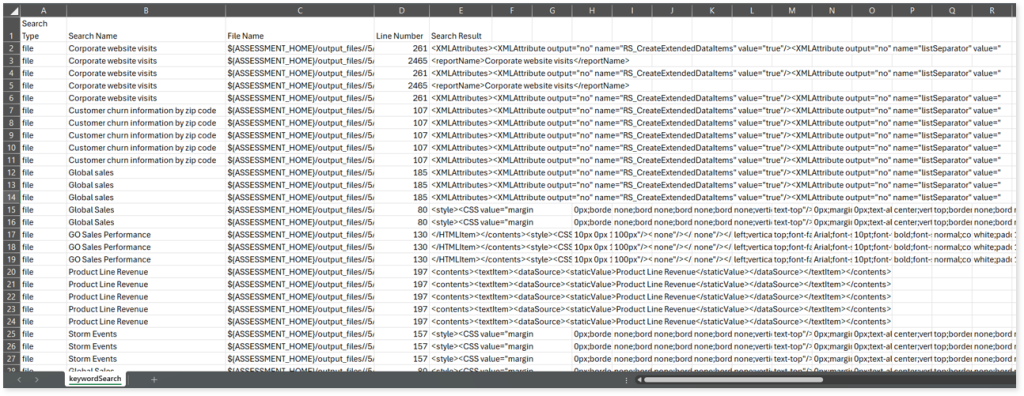
keywordSearch.csv: This report provides information about all the identified files using the file keyword search across uploaded source files. It includes details such as the search type, the file that contains the search keyword, the line number where it occurs, and other related information for each keyword.
This report helps to identify where specific file names appear across the uploaded source files. The system searches for each file name across all other uploaded source files, excluding the same file.
For example, if there are three files—File 1, File 2, and File 3—the system searches for occurrences of File 1 only in File 2 and File 3, excluding File 1 itself.
Lineage_Raw.xlsx: This report provides complete dependency details for all nodes. It provides an end-to-end data and process lineage that helps to identify the complete dependency structure and the data flow.

This report contains the following information:
- Volumetric Info: Provides volumetric information about the artifact types such as tables, logical tables, and reports.
- Nodes: Lists all the source and target nodes along with their type.
- Dependency (Process): Provides information about the process lineage.
- Dependency (Data): Provides information about the data lineage.
- Dependency (Data Model): Provides dependency details about the data models.
Browse through bi > sapbo > csv folders to access all the generated CSV reports such as sapbo_datamodel_summary.csv, sapbo_parameter_field_detail.csv, sapbo_report_detail, sapbo_table_detail, and more.
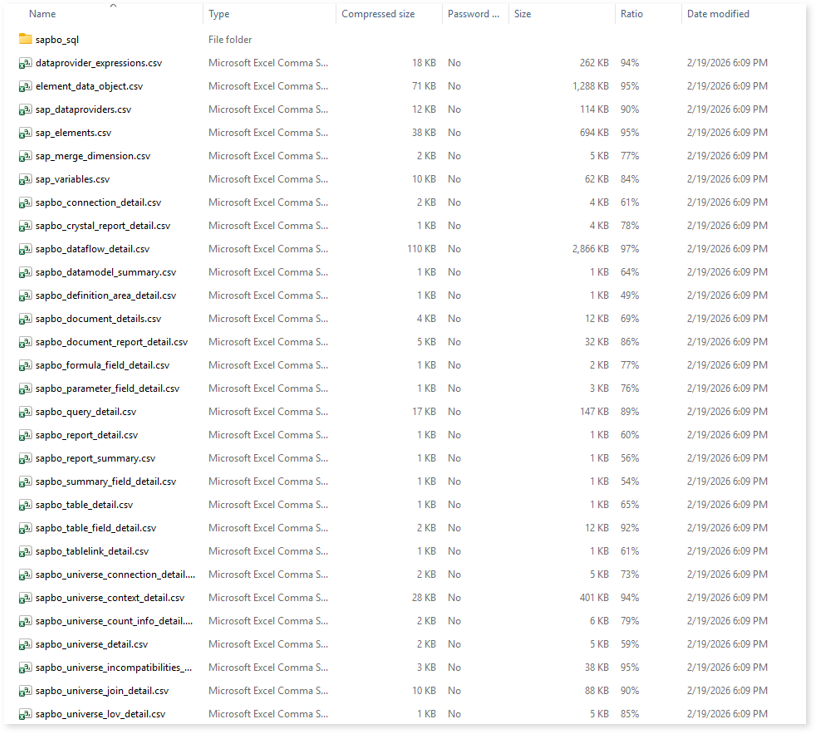
sapbo_datamodel_summary.csv: This report provides data models including total number of sub reports, tables, used tables, formula fields, complexity and more.
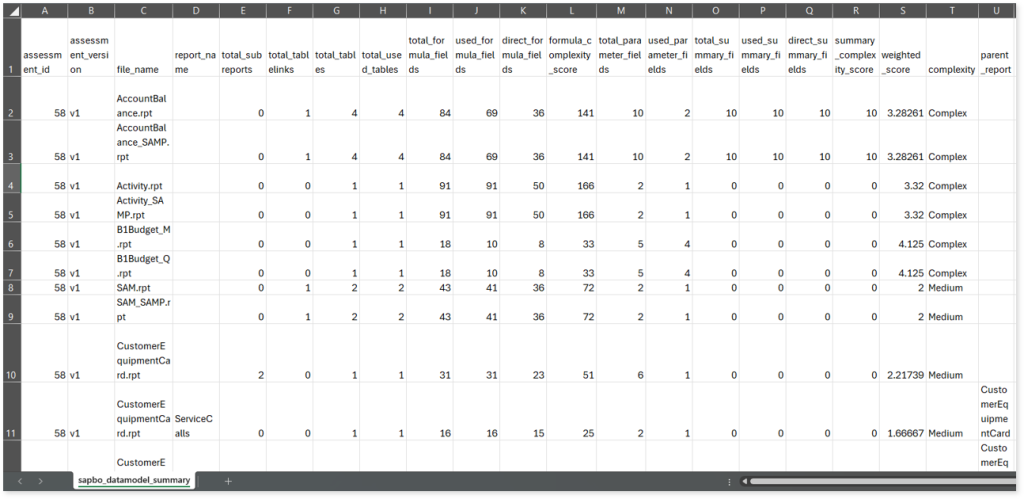
sapbo_parameter_field_detail.csv: This report provides information about parameters including its type, expression or formula that uses the parameter, prompt text, and more.

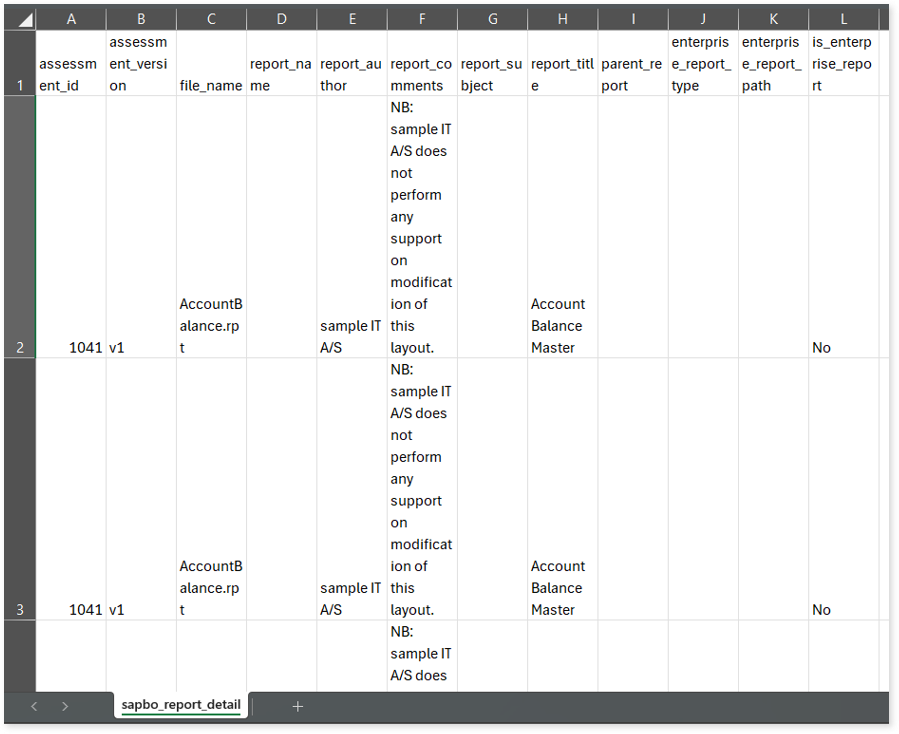
sapbo_report_detail.csv: This report provides information about reports including report subjects, parent reports, report comments, and more.
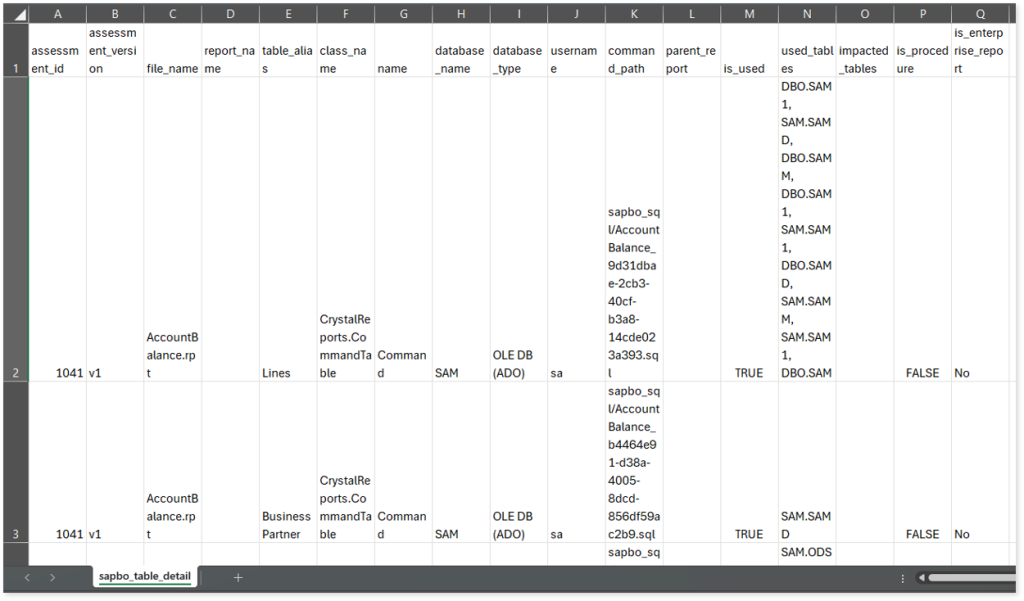
sapbo_table_detail.csv: This report provides information about tables along with information about table aliases, databases, parent reports, used tables, and more.
Lineage Analysis
This section provides lineage-related reports, including entity_link.csv, entity_report.csv, entity_summary.csv, link.csv, script_report.csv reports.
entity_links.csv: This report provides information about how views are connected to entities or tables and how these links extend across multiple levels. Level 1 shows the immediate table to which a view is linked. If that table is further connected to another entity, the next connection appears in Level 2, and so on.
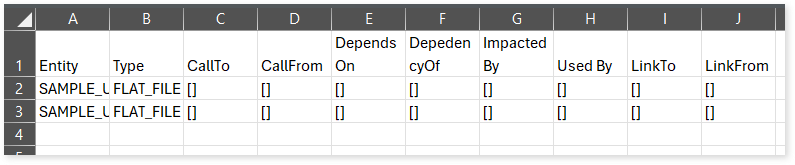
entity_report.csv: This report gives detailed lineage information for each entity in the uploaded source files. It lists all entities along with their types, dependencies, and relationships. The report also shows what each entity depends on, what impacts it, where it is used, and so on.
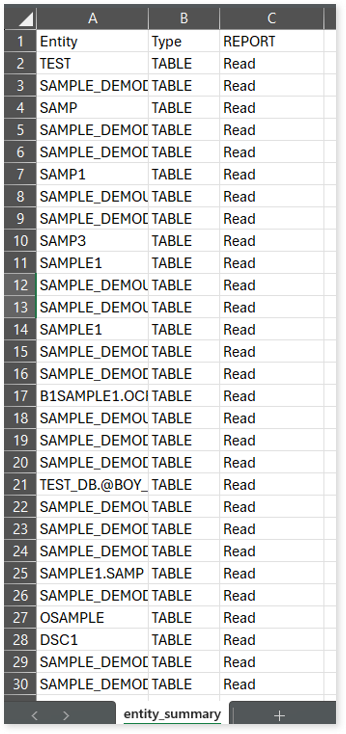
entity_summary.csv: This report provides a list of entities from uploaded source files, indicating where they appear (e.g., reports) and the operations performed on them—Read, Write, or ReadWrite.
link.csv: This report provides information about entities linked to each view.
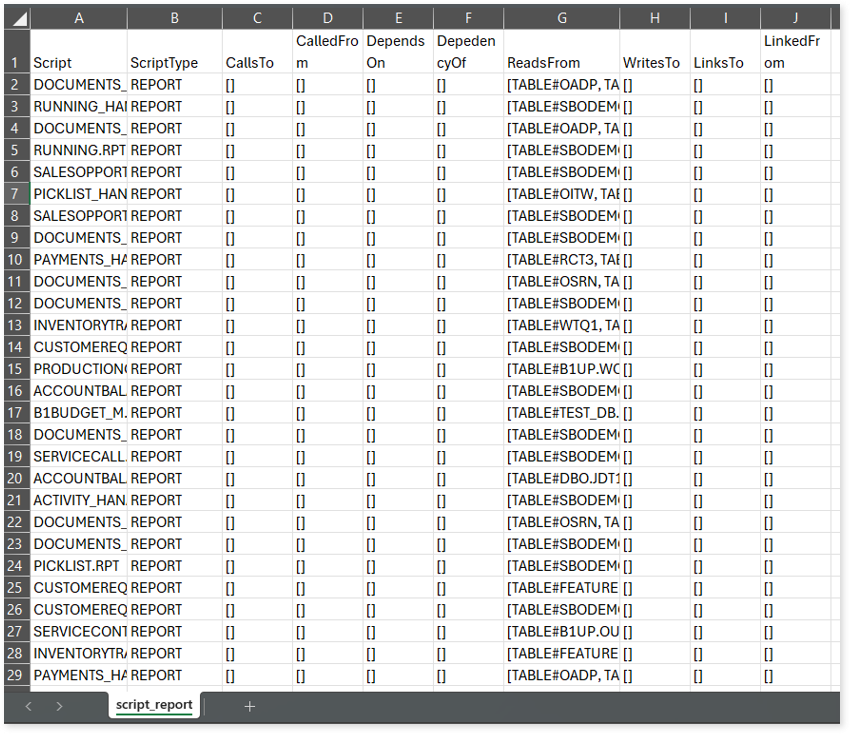
script_report.csv: This report provides detailed lineage information for each script. It lists all scripts along with their type, specifies the processes, entities, or scripts from which each script reads data and those to which it writes, as well as other dependency details.
 Leaplogic